

Why HUB clicks don't match your analytics visits
If you run a crypto exchange, an iGaming operator, or a finance app, you will usually see more clicks in HUB than visits or sessions in Google Analytics, Mixpanel, or your tracker. Some gap is normal, because the two tools count at different moments. Your conversions tell you whether it matters.
Why the numbers differ
HUB counts a click the moment someone clicks your ad. Your analytics counts a visit once your landing page loads and its tag runs. Anything that happens in between creates the gap.
- The page loads slowly. Some people leave before the page finishes loading, so the analytics tag never runs. This is the most common cause, and it is worst on mobile.
- The tag is blocked. Ad blockers, privacy browsers, and visitors who decline your cookie banner can stop your analytics from recording a visit that did happen.
- The tracking parameters are lost. If your landing page redirects and drops the UTM tags, the visit still arrives, and your analytics files it under direct traffic or another source.
- The tools count different things. One person who clicks twice within a few minutes is two clicks in HUB and often one session in your analytics.
- The day is still settling. HUB shows clicks within the hour and removes invalid traffic after the fact, while your analytics processes on its own schedule. See Why Today's Numbers Don't Match Yet.
How to check the gap
1. Compare like with like. Use the same campaigns, the same dates, and the same time zone in both tools, and compare once the day has closed.
2. Confirm your UTM tags arrive. In Step 2 of the campaign builder, add utm_source and utm_medium to your landing-page URL. Then open that URL yourself and check the tags are still in the address bar once the page has loaded. If they disappear, a redirect is stripping them. See Understanding UTMs and Tracking Parameters.
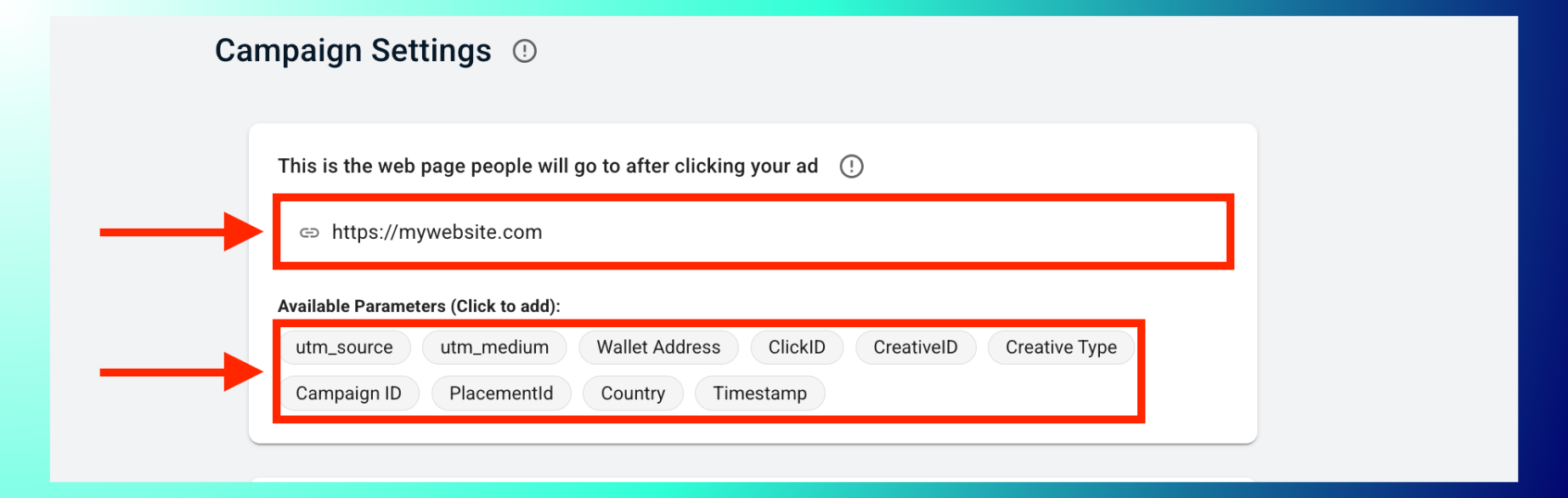
3. Load the page on a phone. Open it on mobile data. If it is slow to show content, speed it up before you change anything in the campaign. Landing pages must load quickly and work on mobile under the Advertising Policies.
4. Find Blockchain-Ads traffic in your analytics. Filter by your utm_source, or in HUB open More Products › Integrations › View Dashboard, where First User Source/Medium separates Blockchain-Ads visitors from your other traffic. See Connect Google Analytics and Mixpanel. If you use Keitaro or Voluum, also pass ClickID, so each visit your tracker records can be matched to a click.
5. Compare against your other paid sources. If the gap for Blockchain-Ads is in line with your other paid traffic in the same analytics tool, it is a measurement difference.
When the gap matters
Judge the traffic by what it does, using the conversions you track in HUB.
- Conversions are coming in at a CPA you can work with: the gap is a reporting difference, and the campaign is doing its job.
- Clicks are healthy but conversions are close to zero: check your landing page and your conversion setup first. See My conversions are not tracking.
- The gap stays large after the day closes, and none of the checks above explain it: export the report from Advertising › Reports and send it to your account manager or Support with the campaign ID and the period.

