

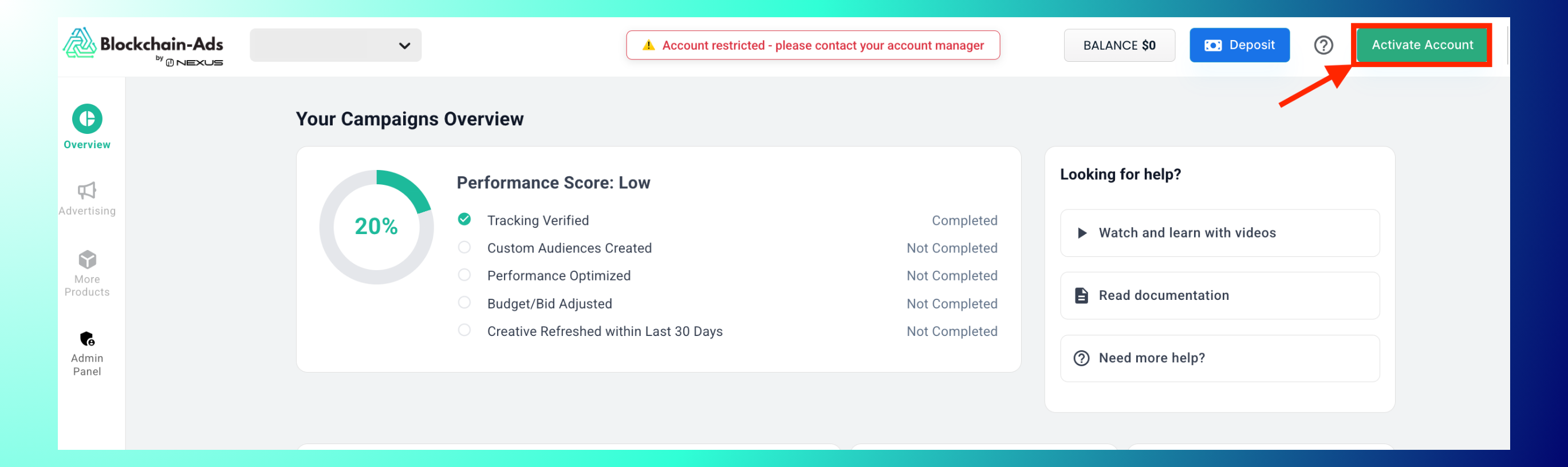
If your account has been restricted, you'll see an "Account restricted - please contact your account manager" banner in HUB, along with an Activate Account button in the top-right corner.
Why accounts get restricted or closed
Two situations lead here. If your account was approved but not activated (funded and running) within 15 days, it loses its qualification status and needs to go through verification again. Separately, an account that stays inactive, not logged into, for more than 6 months is closed down; Blockchain-Ads reaches out before that point to help you keep the account active, so closure is a last step, not a surprise.
Steps to Reactivate
Log in to HUB: if your account is restricted, you'll see the warning banner immediately. Click Activate Account in the top-right corner.
This opens a Verification Meeting booking page with the Blockchain-Ads media team. Select a date and time (30 minutes), and confirm your time zone.

Attend the call: it covers defining campaign goals and metrics and re-qualifying for platform access.
Note: This mirrors the same Advertiser Qualification & Verification (AQV) process used for new accounts. Reactivation isn't a self-serve toggle; it's a re-verification call with the team.
Best Practices: Book the call as soon as you see the restriction banner, since campaigns stay paused until access is restored. Come prepared to speak to your campaign goals and metrics, since that's explicitly part of the call agenda.
Troubleshooting: Don't see the "Activate Account" button? Confirm you're logged into the correct account. The button only appears when an account is actually restricted. Can't find a suitable time slot? Check the time zone selector; availability may look different across zones.
FAQs
- Do I need to re-verify my business details? Yes, the call covers qualifying for access again, similar to initial onboarding.
- Will my campaign data and history still be there after reactivation? Your account and its history are not deleted, only access is restricted; confirm current campaign specifics with your account manager on the call.
- Is there a cost to reactivate? The verification call itself carries no separate charge. Reactivating restores access; it does not by itself change your funding or minimums, covered in Minimum deposit and daily budget.
- What if I miss my booked verification call? Since reactivation runs on the same AQV process as new accounts, the same policy applies: missing the call closes that window, and you can re-enroll after 30 days.

