
A UTM is a small tag added to the end of your URL that tells your analytics tool (like Google Analytics) where a visitor came from. It doesn't affect your page. It works silently in the background.
Example:
https://yoursite.com/?utm_source=blockchain-ads&utm_medium=display
Everything after the '?' is tracking data. Visitors never see it.
Standard UTM Parameters
Supported by virtually every analytics platform.
| Parameter | What it tracks | Example value |
|---|---|---|
| utm_source | Identifies where your traffic is coming from: the platform or website. | blockchain-ads |
| utm_medium | Describes the type of marketing channel used to deliver the ad. | display, cpc, banner |
💡 Tip: Think of utm_source as "who sent them" and utm_medium as "how they were sent."
Blockchain-Ads Tracking Macros
Blockchain-Ads also supports dynamic macros: placeholders that automatically fill in real click data the moment someone clicks your ad. No manual entry required.
ℹ️ The curly brackets like {clickid} are placeholders. They're replaced with real values at click time.
| Parameter | What it tracks | Example value |
|---|---|---|
| clickid | A unique ID for each individual ad click. Essential for conversion tracking. | {clickid} |
| creativeid | Identifies which specific ad creative was clicked. | {creativeid} |
| creative type | The format of the creative shown (banner, native, etc.). | {creative type} |
| campaign id | Identifies which campaign the click came from. | {campaign id} |
| placementid | The specific website or app placement where your ad appeared. | {placementid} |
| country | The country of the user who clicked. | {country} |
| timestamp | The exact date and time the click happened. | {timestamp} |
How to Add Parameters to Your URL
When creating a new campaign, the second step takes you to campaign settings.
In Campaign Settings, paste your destination URL into the destination field, then click the parameter buttons you want to include. Each is appended automatically with no manual editing needed.
- Paste your URL (e.g.
https://yoursite.com/landing). - Click any parameter button to add it.
- Repeat for each parameter you need.
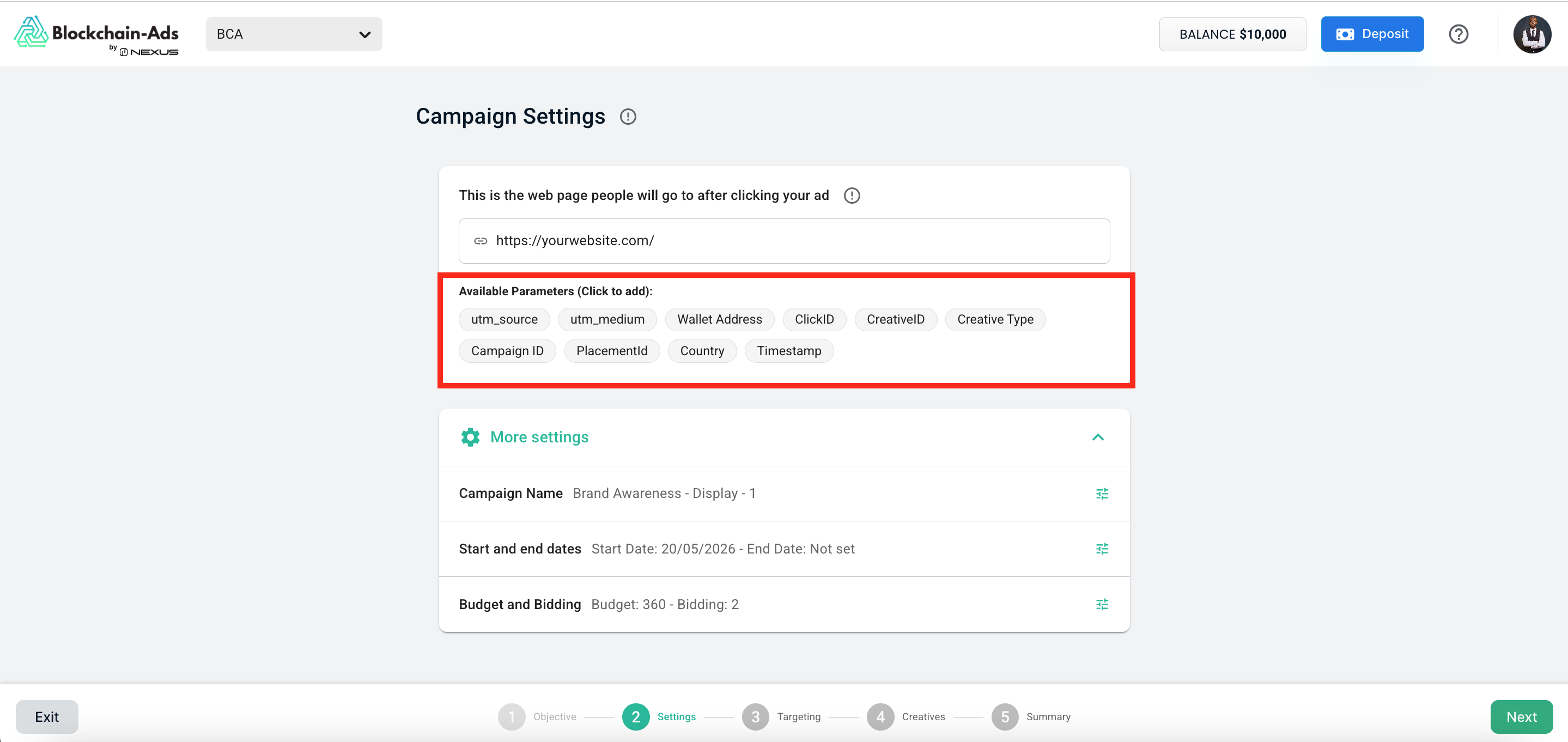
Your final URL will look something like this:
https://yoursite.com/landing?utm_source=blockchain-ads&utm_medium=display&clickid={clickid}&country={country}
Recommended Starting Setup
At minimum, add these three:
- utm_source: So your analytics know traffic came from Blockchain-Ads.
- utm_medium: To distinguish ad traffic from email, organic, and other channels.
- clickid: Required if you're using an attribution tool like Adjust or Voluum.
Add the others as your reporting needs grow.
Frequently Asked Questions
Do I have to use UTM parameters?
No, but strongly recommended. Without them, your analytics can't tell you which ad or campaign drove a visitor to your site. You'll just see a traffic spike with no source.
What's the difference between a UTM and a macro?
A UTM is a static label you write yourself (e.g. utm_source=blockchain-ads). A macro is a dynamic placeholder like {clickid} that gets filled in automatically at click time with a unique value, with no editing required on your end.
What analytics tools work with these?
utm_source and utm_medium work with virtually any analytics platform: Google Analytics (GA4), Adobe Analytics, Mixpanel, Segment, and others. The Blockchain-Ads macros (clickid, creativeid, etc.) are designed for attribution tools like Adjust, Voluum, and Branch.
My clickid isn't appearing in my attribution tool. What do I check?
First, confirm {clickid} is in your destination URL in Campaign Settings. Then check that your attribution tool is configured to receive the click ID via the correct parameter name. If you're still stuck, contact support with a screenshot of your destination URL.
Can I mix custom UTM values with macros?
Yes. Static values and macros work together freely. For example: https://yoursite.com/?utm_source=blockchain-ads&utm_campaign=summer2025&clickid={clickid} utm_campaign is a static value you set; {clickid} fills in automatically at click time.
Where can I see my UTM data after a campaign launches?
In Google Analytics, go to Acquisition or Traffic Sources. You'll see a breakdown by utm_source and utm_medium. For macro-level data like clickid or country, check your attribution tool or the Blockchain-Ads reporting dashboard.
Still have questions? Contact Blockchain-Ads support.