
How to Use First-Party Data in Programmatic Advertising
Key takeaways
- Track first: Install the pixel and verify your conversion events before launch, since tracked advertisers reached a first deposit or trade 92% more often.
- Pick one source: Start with the first-party source you already have, whether a consented customer list, site visitors, or tracked events.
- Layer your data: Own data plus platform segments recorded a deposit, purchase, or trade 62% of the time, against 28% for own data alone.
- Model lookalikes: Seed lookalikes with the event the campaign is built to drive, and exclude that seed from the lookalike campaign.
- Suppress customers: Exclude existing customers from acquisition campaigns and check the estimated audience size before you launch.
If you run growth or CRM at an exchange, sportsbook, casino, or broker, you already hold the data your programmatic campaigns are missing. Your pixel records who visited and signed up, and your CRM knows who deposited, traded, and went quiet. The problem is that this data often doesn't make it into the campaign builder, where many teams still rely on country, device, and platform-based audience segments.
Blockchain-Ads’ study of campaigns across crypto, iGaming, and finance puts a number on the traffic many teams have been missing. Ad sets built on the advertiser’s own data recorded a deposit, purchase, or trade 75% more often than ad sets targeted by country and device alone. With platform segments layered on top, the figure rose to 121%.
The seven steps below take you from a pixel and a customer list to your own first-party audience running in the campaign builder, with existing customers excluded.
What First-Party Data Does in a Programmatic Campaign
First-party data in programmatic advertising is the information you collect from your own visitors and customers, such as site visits, tracked events, CRM records, and wallet addresses. It becomes useful for programmatic targeting when you turn it into an audience that a demand-side platform (DSP) can bid on.
In a campaign, it does four jobs:
- Reaches people who already know you
- Finds new people who resemble your audience
- Narrows platform segments toward the people most likely to act
- Keeps current customers out of acquisition spend
Platform segments describe people from the outside. When you build a programmatic audience from them, you choose people based on wallet activity, betting behavior, or interest in forex and stocks. Your own data describes people who have already done something with your product, like opening the deposit page, finishing KYC, or placing a first trade.
That difference shows up in the results. In The State of Measured Acquisition, 2026 Edition, Blockchain-Ads analyzes over 200 advertisers and 1,400 ad sets run from 2024 to 2026. It also compared how often ad sets recorded a deposit, purchase, or trade within 30 days. It counted ad sets that reached at least 100,000 impressions and had tracking set up before launch.
Using first-party data increased conversion capture by 75% over country-and-device targeting, with 28% of ad sets recording a deposit or trade against 16%. On its own, though, it trailed platform segments, which reached 53%. An advertiser’s own data audiences only contain people who already found you. So they tend to be small, and a small audience rarely carries an acquisition campaign by itself. The strongest row in the table is the combination, which will be discussed in step 4.
Read these figures as a record of how the study’s advertisers built their audiences. Each advertiser chose its own conversion events, which ranged from sign-ups and wallet connections to first deposits and trades. Note that your results will depend on your product, markets, and creative.
First-Party Data Activation: The Sources You Can Use
Four kinds of first-party data become programmatic audiences on Blockchain-Ads. Each comes from a different system and needs a different setup before you can use it.
Crypto products collect one identifier that other industries don’t: the wallet address. Exchanges and DeFi apps see it when a user connects a wallet, and a Blockchain-Ads conversion event can connect a wallet ID with each sign-up or deposit. Uploaded wallet lists match against the platform’s database at a match-back rate that usually runs from 10% to 40%. So a list of 20,000 wallets could become an audience of 2,000 to 8,000. After which, you plan your first-party data strategy (seeds) and exclusions around the matched audience.
Nothing you upload arrives as raw data. Blockchain-Ads accepts only salted, one-way SHA-256 hashes, sent via CSV upload, and an API sync from your CRM or customer data platform. It also accepts a tracking script that hashes in the visitor’s browser.
Blockchain-ads purges campaign audience data 30 days after a campaign ends, and we remove a visitor’s hash across the platform within 24 hours if they opt out. These are two rules that govern how we handle uploaded data. Consent stays your responsibility, so upload only lists you collected with consent under the rules that apply to you, including GDPR and CCPA.
1. Install the Pixel and Verify Your Conversion Events
Every own-data source except an uploaded list depends on tracking, so set it up before the first impression is bought. In the study, advertisers who set up tracking before launch reached a first deposit or trade 92% more often than those who didn’t (46% against 24%).
To install the pixel, open the Tracking tab in the Blockchain-Ads HUB and click Setup Tracking. You’ll choose between three methods:
- Custom BCA Pixel: paste the code into your site, which takes 5 to 10 minutes and suits simple sites
- Google Tag Manager: add the code as a custom HTML tag, which takes 10 to 15 minutes
- Server-to-Server (S2S): configure events on your backend, which takes 15 to 30 minutes and doesn’t depend on the visitor’s browser
Name each pixel after what it measures, then share the implementation guide from the setup page with whoever owns your site or backend.
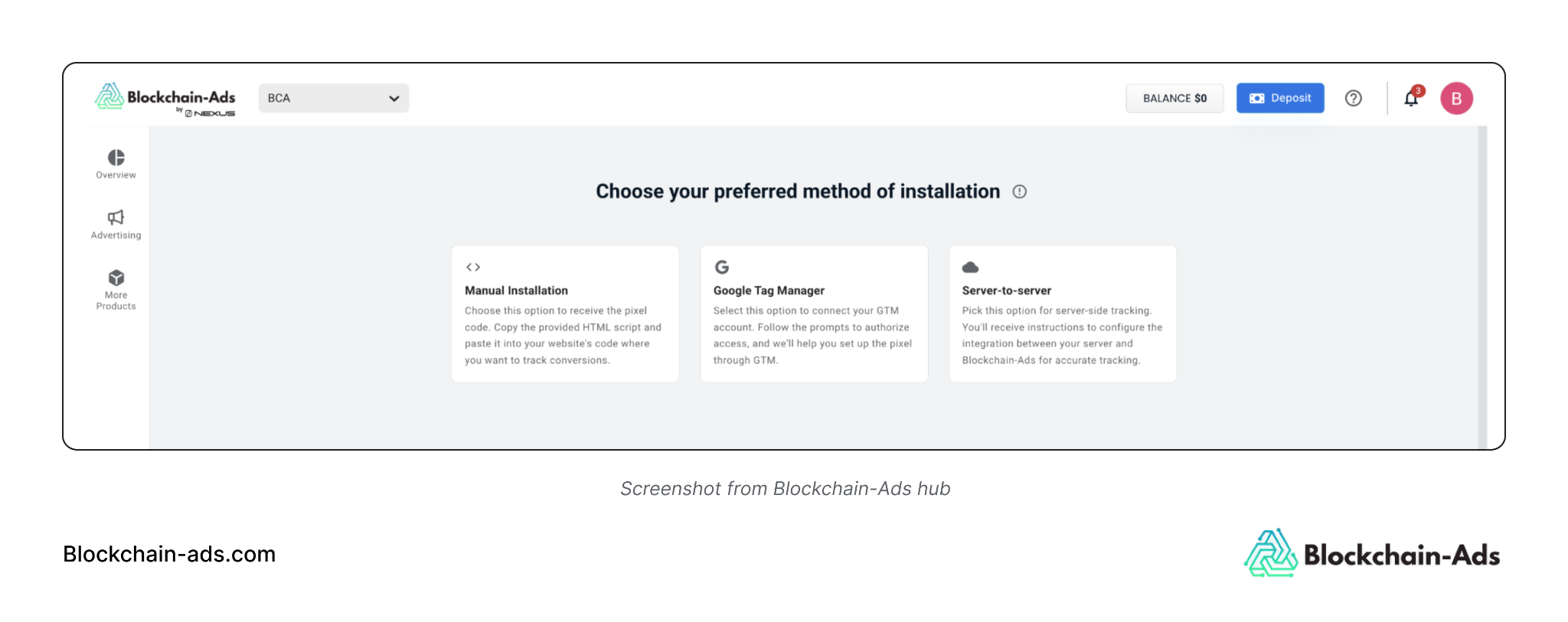
Conversion events come next because they turn page views into audiences you can act on.
Under Advertising, go to Tracking, open the Conversions tab, and click Create Conversions. The wizard runs through three steps (Setup Method, Setup Conversion, and Installation). Create one event for each funnel stage you might want to retarget, exclude, or model from, such as registration, KYC complete, first deposit, and first trade or bet.
Two optional fields under Advanced Options are worth filling in. Wallet ID records which wallet completed the event, and Transaction Value feeds the Txn Value and ROAS columns in Reports, which stay empty without it.
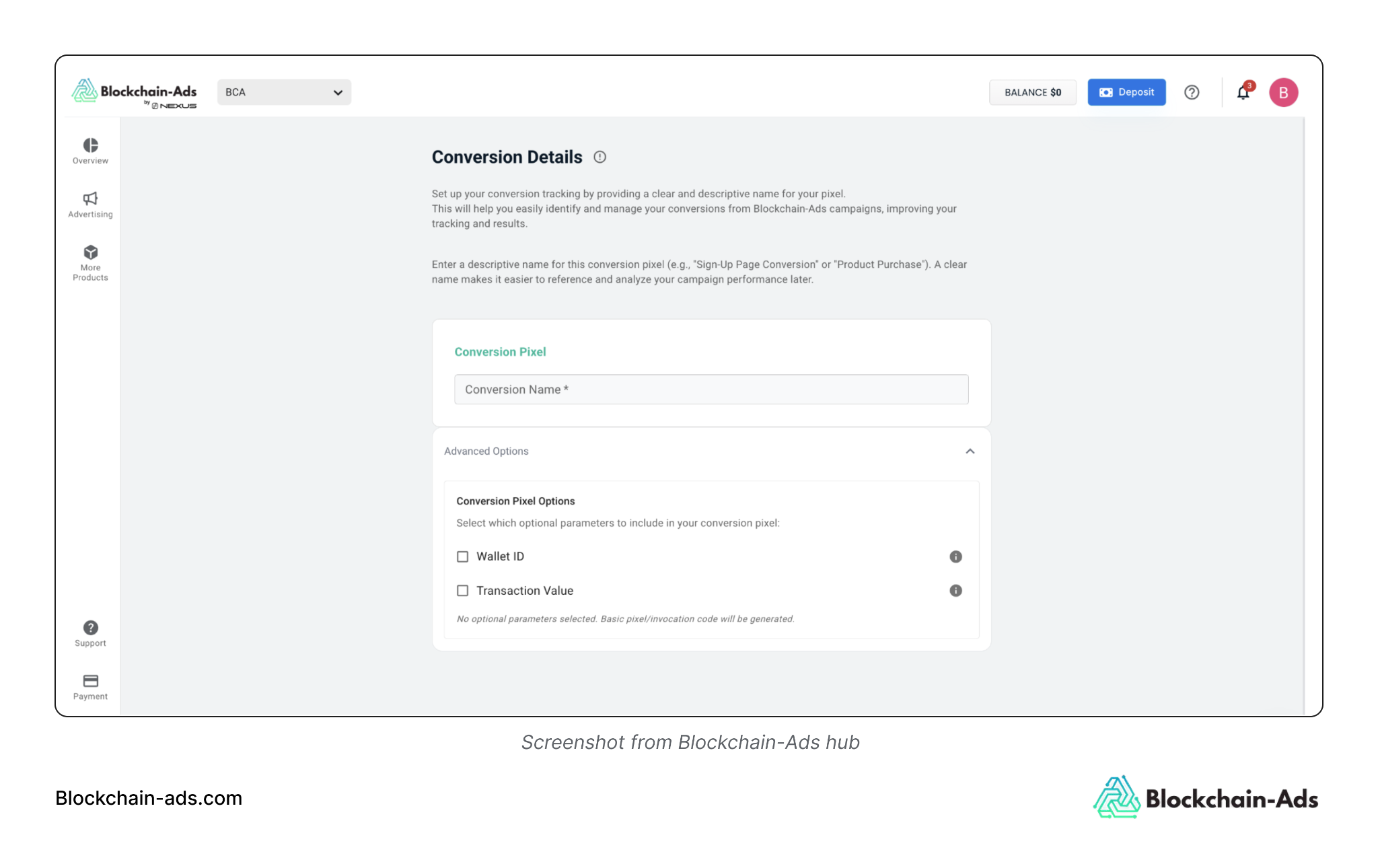
Each saved event gets a Tracker ID, and you can install conversion tracking events as a JavaScript pixel. This is an image pixel for platforms that block scripts or a server-to-server URL. Run each one through the Test control before launch. An event shows as Verified once the platform receives a valid hit, and new data can take 5 to 15 minutes to appear.
With the pixel installed and your events verified, collection is already running. How to collect first-party data for a campaign comes down to two captures. Your pixel and conversion events record what visitors and users do (visits, registrations, KYC, deposits, trades), and your CRM holds who they are, collected with consent. The pixel collects from the moment it is installed, so every day it runs adds to the audiences you can build in the next step.
2. Decide Which Source to Activate First
Your first-data source depends on what you have available when the campaign launches. The study’s advertisers didn’t follow one order. Of the 65 that ran both platform segments and their own data, 34 started on segments, 22 started on their own data, and 9 launched both on the same day. Among advertisers that started on segments, the first own-data ad set appeared, on average, around 25 days.
Here’s how to pick:
- Got a customer list collected with consent? Upload it before launch. On day one, it works as an exclusion list for prospecting, and later it seeds your lookalikes.
- Pixel firing, but the site doesn’t get much traffic yet? Launch on platform segments and add site-visitor and event audiences once the pixel has recorded enough activity to build an audience you can read. Advertisers in the study who started on segments took a median of 25 days to add their own data.
- Holding a wallet list from a launch, waitlist, or past campaign? Upload it, and hopefully, 10% to 40% of it will match.
Use of first-party data also grew with campaign activity. Only 5 of the 31 advertisers who ran a single ad set used first-party audiences, against 28 of the 46 who ran six or more. Overall, 92 of the 218 advertisers in the study used first-party audiences built from site visitors, tracked events, customer or address lists, and saved retargeting audiences. As you add ad sets, plan for some of them to carry your own data.
3. Build Your First Own-Data Audience in the Campaign Builder
Custom audiences live in the campaign builder, so you build them while setting up targeting. Here’s how to create a custom audience on Blockchain-Ads:
- In the campaign’s Audience & Targeting step, switch to Manual Targeting. Automated Targeting is the default, and custom segment creation isn’t available there.
- Under Segments, expand Create new segment and click + Create new segment.
- Build the segment from Your Data, choosing site visitors, a tracked event, or an uploaded list.
- Name it after the source and the time window, such as “Registered, no deposit, 30 days,” so you can find it in later campaigns.
- Save it. The segment then appears under Create new segment for this campaign and future ones.
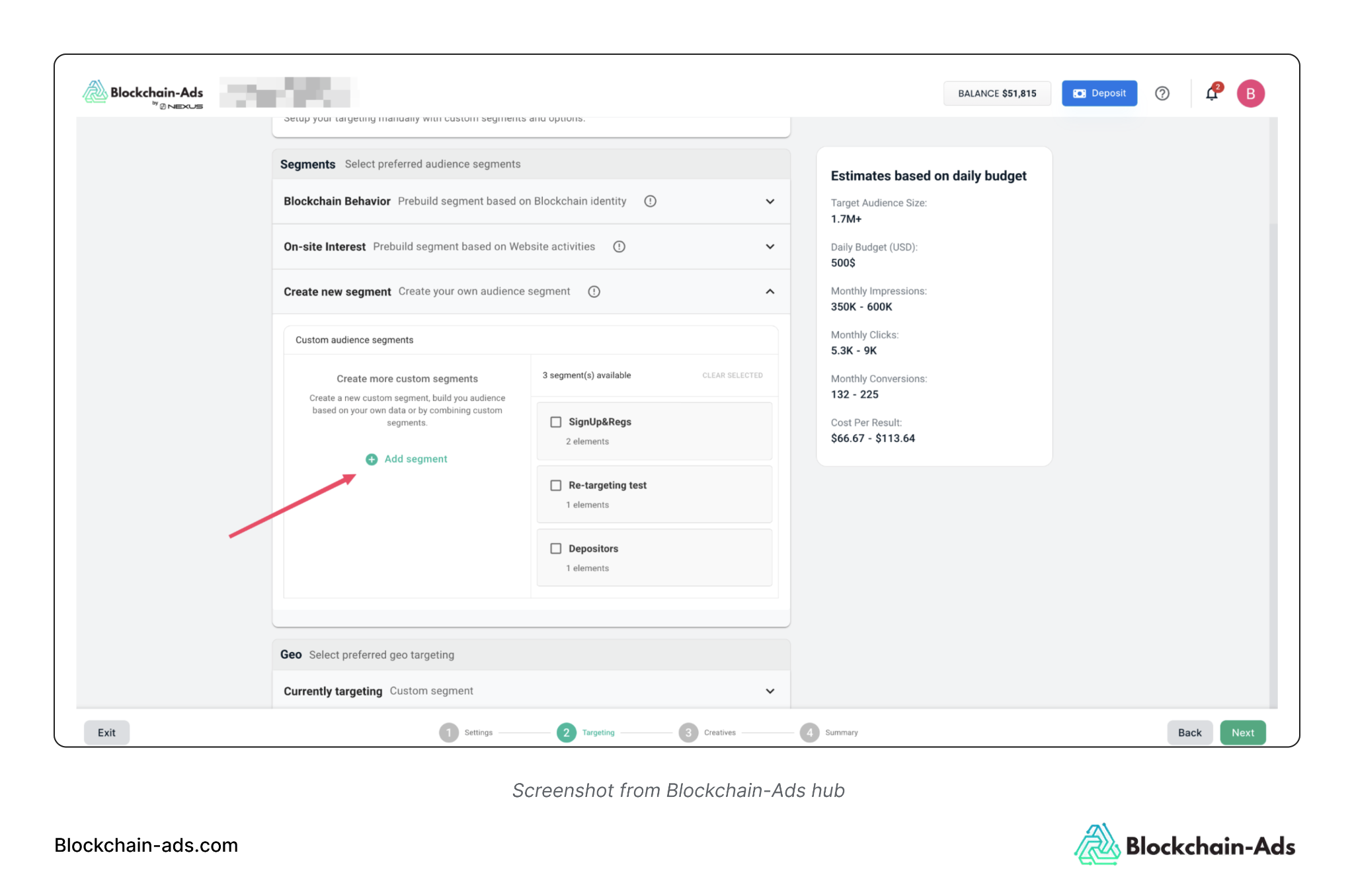
Set the time window by how warm you want the audience to be. Blockchain-Ads recommends 7 to 30 days for retargeting warm audiences and 60 to 90 days if the shorter window leaves the audience too small. A 7-day window of people who opened the deposit page is a different audience from a 90-day window of everyone who visited. So build them as separate segments rather than one broad one.
4. Layer Your Own Data on Platform Segments
Pairing first-party data with platform segments increased conversion capture by another 121% in the study and by 288%, when compared against country-and-device targeting. Of the 316 first-party ad sets, 77% also carried platform segments.
This is what first-party data enrichment looks like inside a DSP. Your data tells the campaign who has engaged with your product. Then the behavioral and intent segments add what those people do elsewhere, like trading on DEXs, betting on sports, or holding stablecoins. For example, a broker retargeting registered but unfunded users could add the Forex and CFD Traders segment, while a casino could pair 30-day site visitors with Casino Players.
Layers change reach in different directions. On Blockchain-Ads, adding multiple segments within the same category allows you to reach people who match any of them, expanding your audience. A second category narrows it to people who match both, and a country list narrows it further. Before you combine segments, check the estimates panel after each layer, and add one layer per test so you can tell which change moved the result.
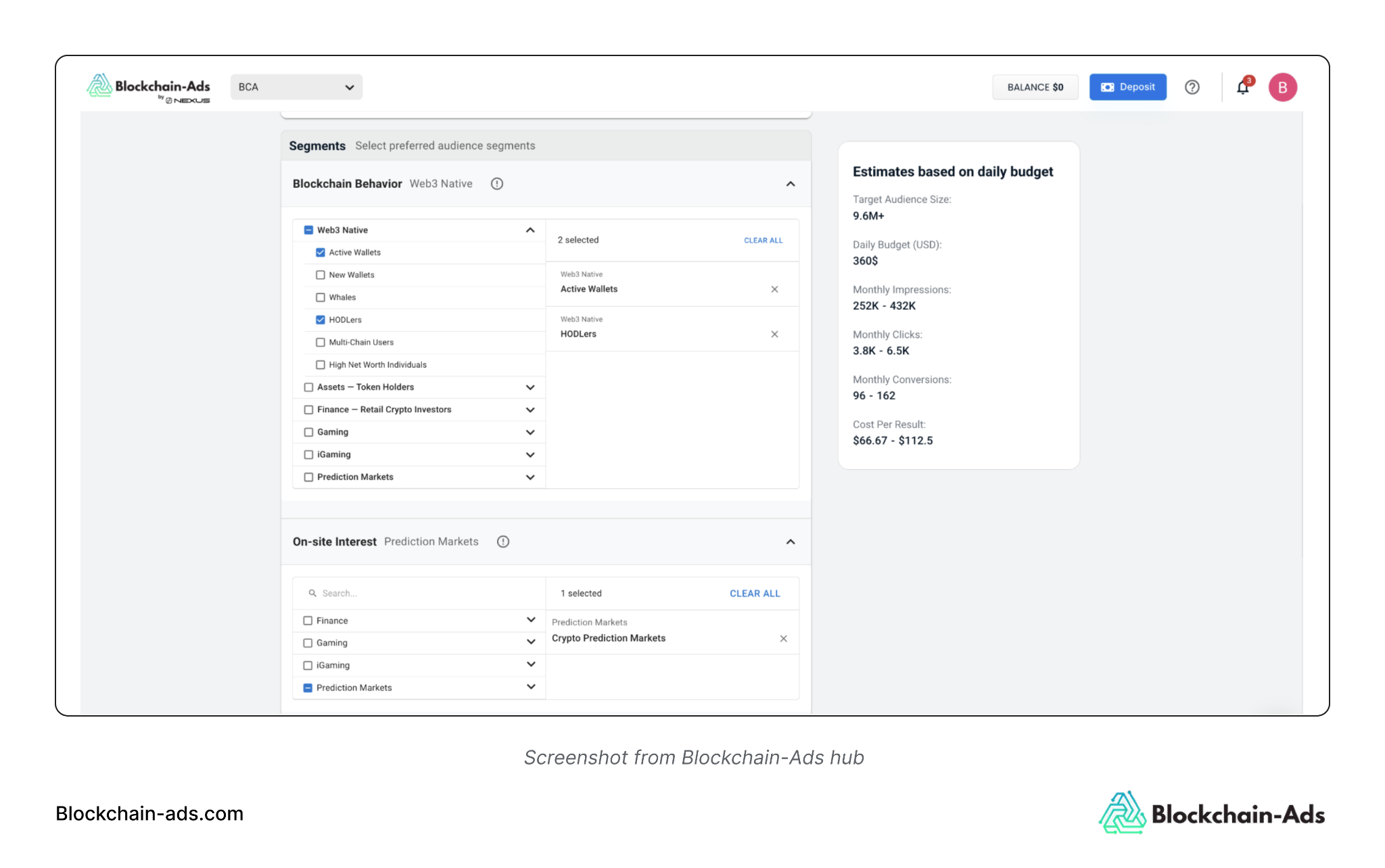
Keep the original segments when your own data arrives. Adding your data on top of the audience you launched with means only one thing changed, so the new results stay comparable with the old ones.
5. Build Lookalikes From the People Who Converted
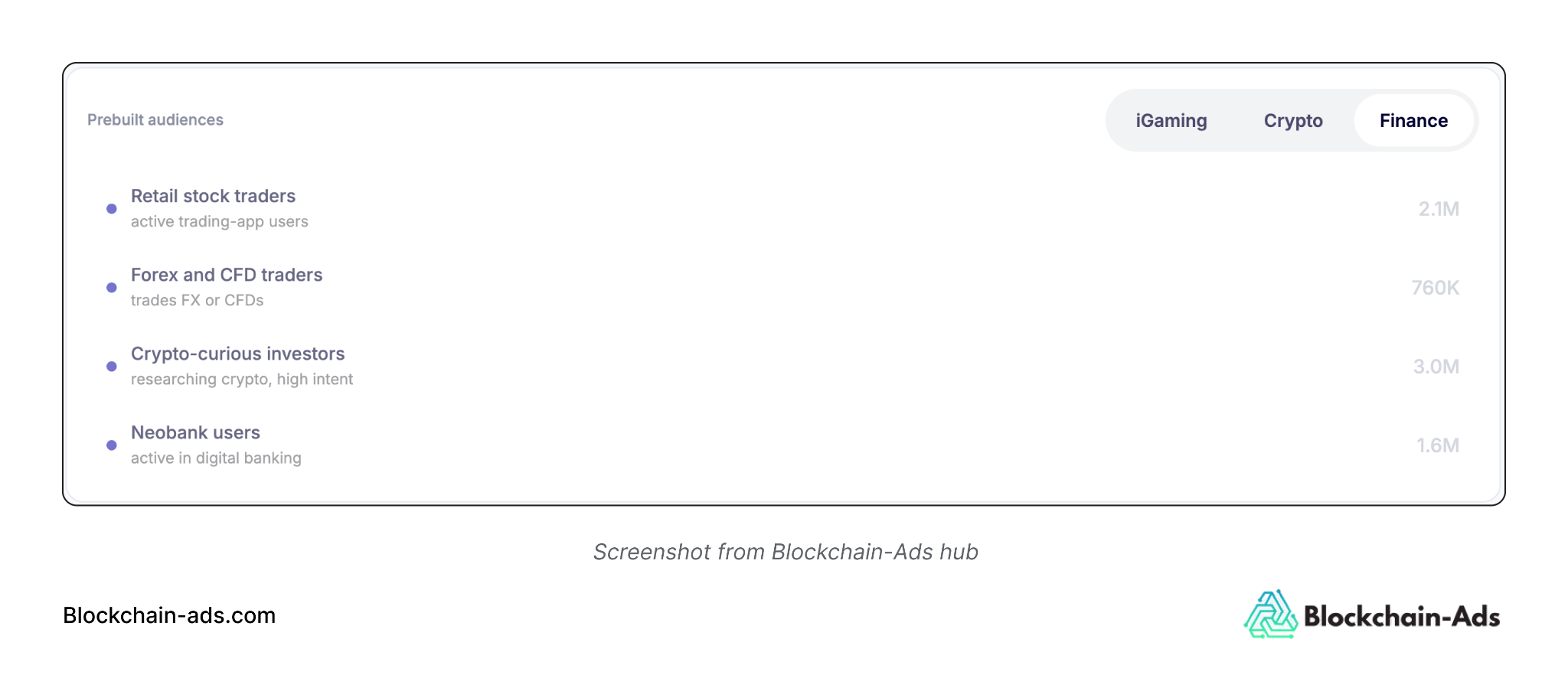
Lookalike audiences in audience targeting on Blockchain-Ads are modeled from the users who already convert and then used to find new people with matching traits. A lookalike adds reach that your own lists can’t, since it’s made of people who haven’t found you yet.
Choose the seed by the event the campaign is built to drive. A seed of first depositors teaches the model what depositors look like, while a seed of registrations teaches it what registrants look like. For a campaign optimized toward registrations, a registration seed fits. For one judged on funded accounts or first trades, seed it with the people who completed those events, even though the list is smaller.
Three habits keep lookalikes useful:
- Exclude the seed from the lookalike campaign, so the budget reaches new people instead of the customers you modeled.
- Refresh the seed as your converter list grows, because a model built on 200 depositors describes them less reliably than one built on 2,000.
- Run the lookalike as its own ad set, so its results don’t blend with retargeting or platform-segment traffic.
Your seed data stays yours. Blockchain-Ads never uses uploaded data to build lookalike audiences for other advertisers and is never sold to data enrichment providers.
6. Exclude Existing Customers With a Suppression List
A suppression list is an audience you exclude from a campaign. In acquisition, it holds people who have already completed the action you’re paying for, so prospecting spend goes only to people you still need to win. It stands as one of the simplest ways to use first-party data in marketing.
Screenshot of excluding audiences from the hub
What you suppress depends on the campaign:
- Prospecting for an exchange: exclude funded accounts and anyone who has traded.
- New-player acquisition for a sportsbook or casino: exclude current depositors.
- Retargeting registrations: exclude people who have already deposited so the audience includes only those who stalled.
- Lookalike campaigns: exclude the seed.
Audience suppression also keeps reporting honest. When existing customers sit inside a prospecting audience, they convert easily and make the campaign’s CPA look better than its new-customer CPA really is.
Excluded groups don’t have to go unreached. People who registered without depositing can move into retargeting campaigns with creatives tied to the step they skipped. Lapsed depositors can get a reactivation campaign of their own.
Keep an eye on the frequency in these smaller audiences. Blockchain-Ads’ default frequency cap is 7 impressions per user per day, and you can lower it in campaign settings if performance starts to fade.
Uploaded lists stay only as current as your last upload. Refresh them on a fixed schedule, such as weekly during an active campaign, or people who deposited last week will keep seeing acquisition ads.
7. Check the Audience Size and Launch
The right-hand estimates panel updates as you add layers, showing Target Audience Size, Daily Budget, Monthly Impressions, Clicks, Conversions, and Cost Per Result. If the size drops sharply or the cost per result climbs after a layer, you’ve probably narrowed too far.
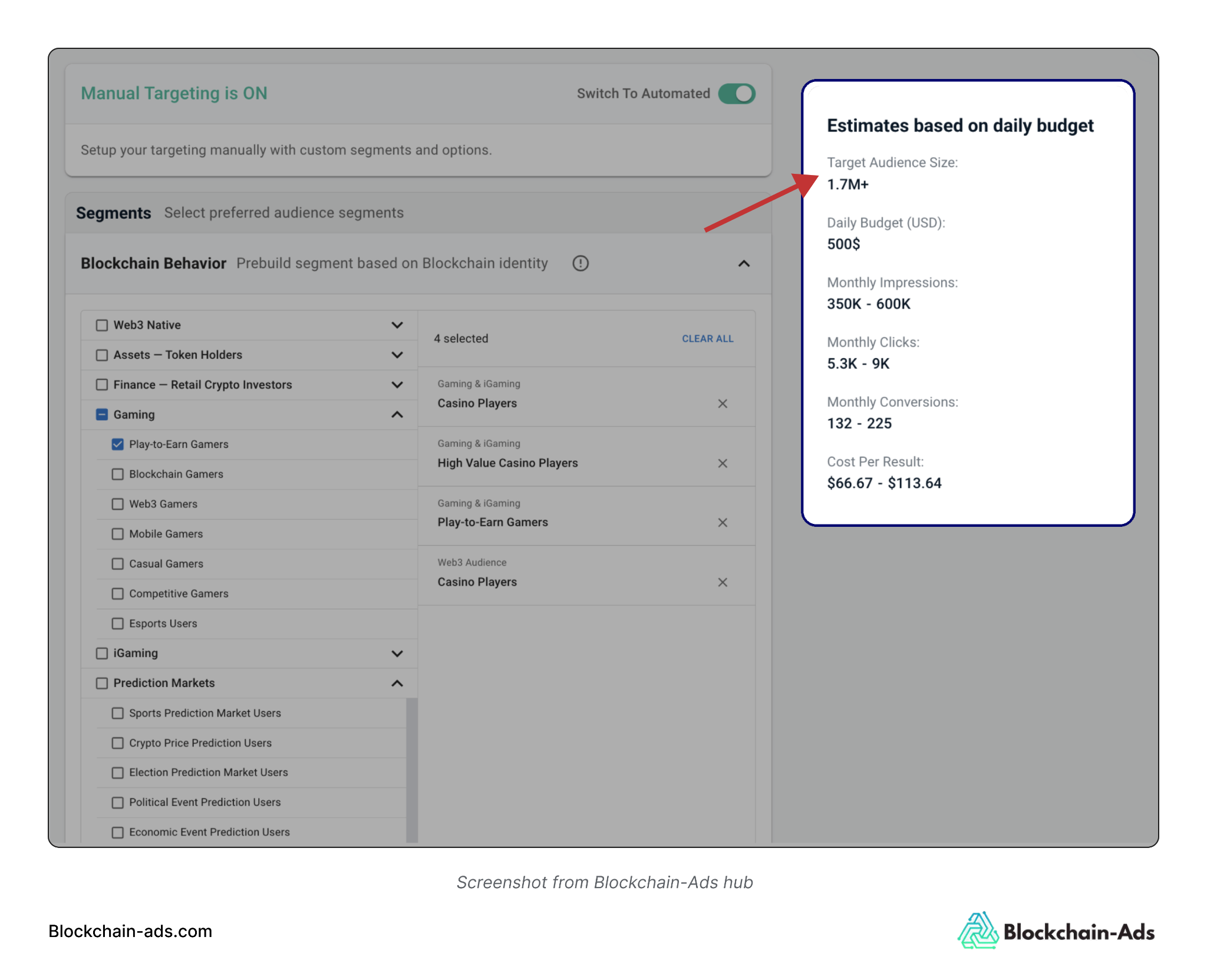
Give each ad set room to deliver. The study only judged ad sets that reached at least 100,000 impressions, which gives you a reasonable floor for a first read. Very small segments also have a reporting limit, because Blockchain-Ads suppresses results for segments with fewer than roughly 100 users to protect privacy.
Once the campaign is live, read each ad set against the event it was built for. First-party data targeting is judged like any other audience: against the event it was built to drive.
A retargeting ad set aimed at unfinished registrations should be judged on registrations, and a lookalike seeded with depositors should be judged on deposits. CTR can look healthy on an audience that never converts, so wait for the conversion events before you decide which audiences to keep.
What Your First Own-Data Audience Should Look Like
By the end of this setup, you should have:
- A pixel on every page and conversion events showing Verified.
- At least one own-data audience saved under Create new segment, built from site visitors, a tracked event, or an uploaded list.
- That audience layered on the platform segments you already run.
- Existing customers excluded from prospecting.
- An estimated audience size you’ve checked in the estimates panel.
- The conversion event you’ll use to judge the audience.
Advertisers in the study who started on platform segments added their own data a median of 25 days later. Once your pixel and conversion events have recorded enough activity to build an audience, start with the source that’s already working. This could be a customer list, a verified deposit event, or site visitors, and layer it on the segments that are delivering.
Blockchain-Ads lets you build first-party, lookalike, and suppression audiences alongside behavioral, interest, and on-chain segments in one campaign workflow. Set up your first campaign on Blockchain-Ads.
Nathan Ojaokomo is a B2B SaaS writer and content strategist specializing in SEO, product-led content, and AI search.
View full profile →