How to Allocate a Paid Media Budget Into Tests You Can Read
Key takeaways
- Cost per conversion: BCA Labs Institute puts the median cost per conversion at $304 for crypto and $197 for iGaming.
- Retargeting ROI: Binance's retargeting phase delivered 1,886 of 4,600 verified conversions at a lower CPA than cold prospecting.
- Budget framework: The 70/20/10 approach puts most budget behind proven activity, less behind emerging bets, and the rest into experiments.
- Test duration: Google Ads recommends 7–14 days for an experiment to stabilize, and 4–6 weeks for statistically significant results.
- Example split: A $40,000 crypto budget example splits into $9,800 Prospect, $16,800 Converge, $3,500 Retarget, and $9,900 Reserve.
Most media plans fail the same way. The money gets spread across enough channels, campaigns, and tests that none of them produces a result you can act on. You finish the month with plenty of activity and no clear decision to make.
The fix is to size each part of the budget around the evidence it needs to produce. If a test can't reach enough conversions to review, you can't make a decision from it, and the money is gone either way.
This guide covers what one test costs, how to split the budget across stages and channels, how many tests the budget can fund, and when to rebalance. The paid media budget planner turns those decisions into a monthly plan.
Start with the Number on Your Paid Media Budget
Before splitting anything, define the total you can spend on paid acquisition this period.
Start with the numbers specific to the campaign:
- Total budget: How much can you spend during this planning period?
- Acquisition goal: How many customers or conversion events does paid media need to generate?
- Decision event: Are you measuring a registration, qualified signup, first deposit, funded account, first trade, or another conversion?
- Target CAC or CPA: What can you afford to pay for that outcome?
- Campaign period: How many days or weeks does the budget need to cover?
- Existing performance data: What do your own CPM, CPC, conversion rate, and cost-per-conversion figures suggest you can buy with that amount?
For example, if your available paid media budget for the month is $40,000, that becomes the constraint for everything that follows. Your acquisition goal and target CAC tell you whether that amount is realistic, while the rest of the plan determines how to distribute it across stages, channels, and tests.
Calculate What One Ad Test Needs to Spend
The amount you assign to a test should come from the event you want to evaluate, rather than an arbitrary percentage of the total budget.
Start by choosing the event that will determine whether you keep, change, or stop the campaign. Depending on the test, the decision event could be a click or a deeper conversion, such as:
- A first trade
- A registration
- A first deposit
- A funded account
- A qualified signup
- Another conversion event tied to the campaign goal
Once you've chosen that event, estimate the cost of generating it. Then, decide how many of those events you want the test budget to cover before you review performance.
You can calculate the planned test budget as:
Planned test budget = expected cost per decision event × planned number of decision events
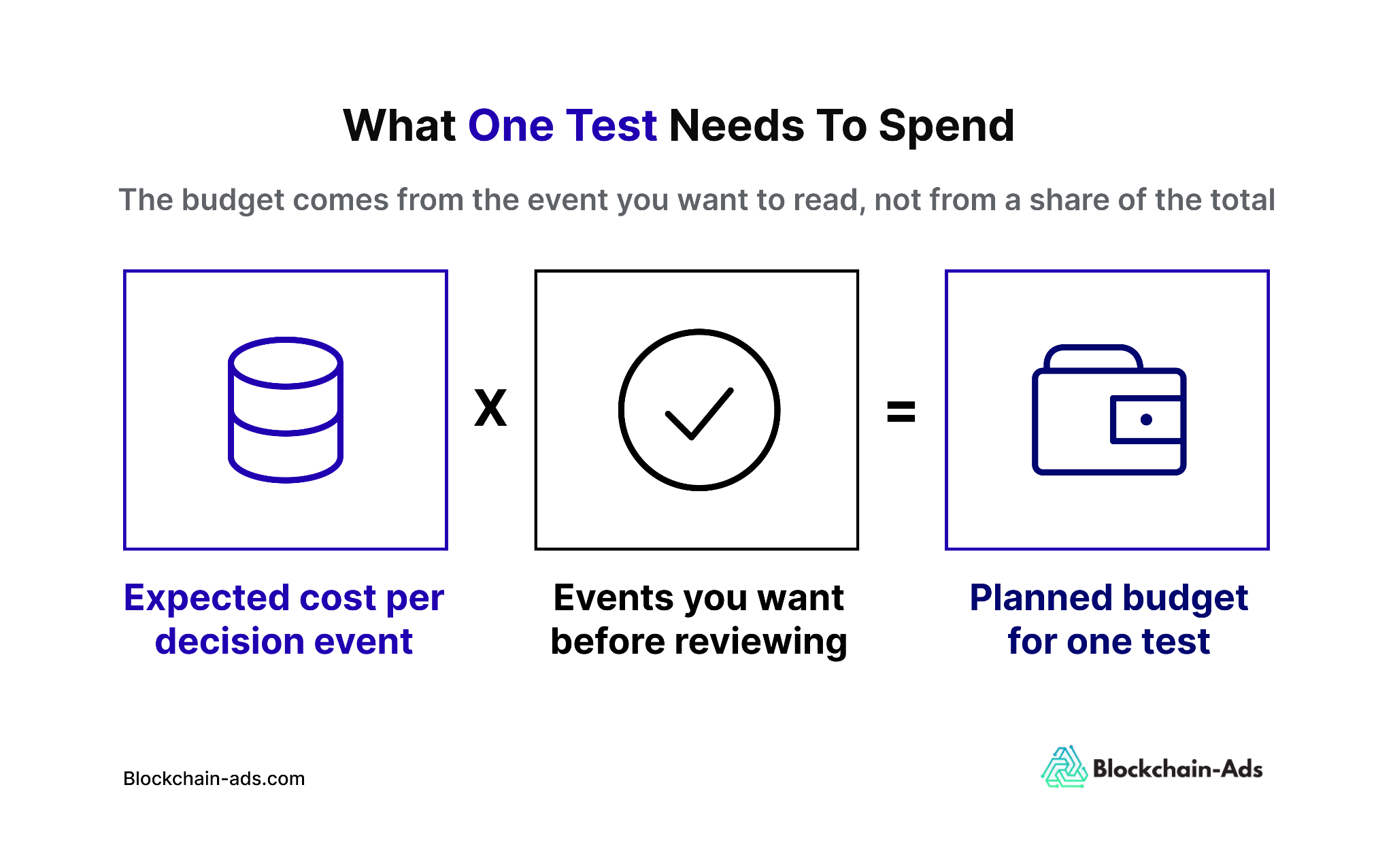
BCA Labs Institute data puts the median cost per conversion at $304 for crypto and $197 for iGaming. If you decide to fund a test for 10 conversions before the first review, that gives you:
The 10- and 20-conversion figures are planning inputs, so don't use them as universal thresholds. They show what the test would need to spend if that is the amount of conversion data you want available before making a directional budget decision.
Don’t Confuse a Planning Threshold with Statistical Significance
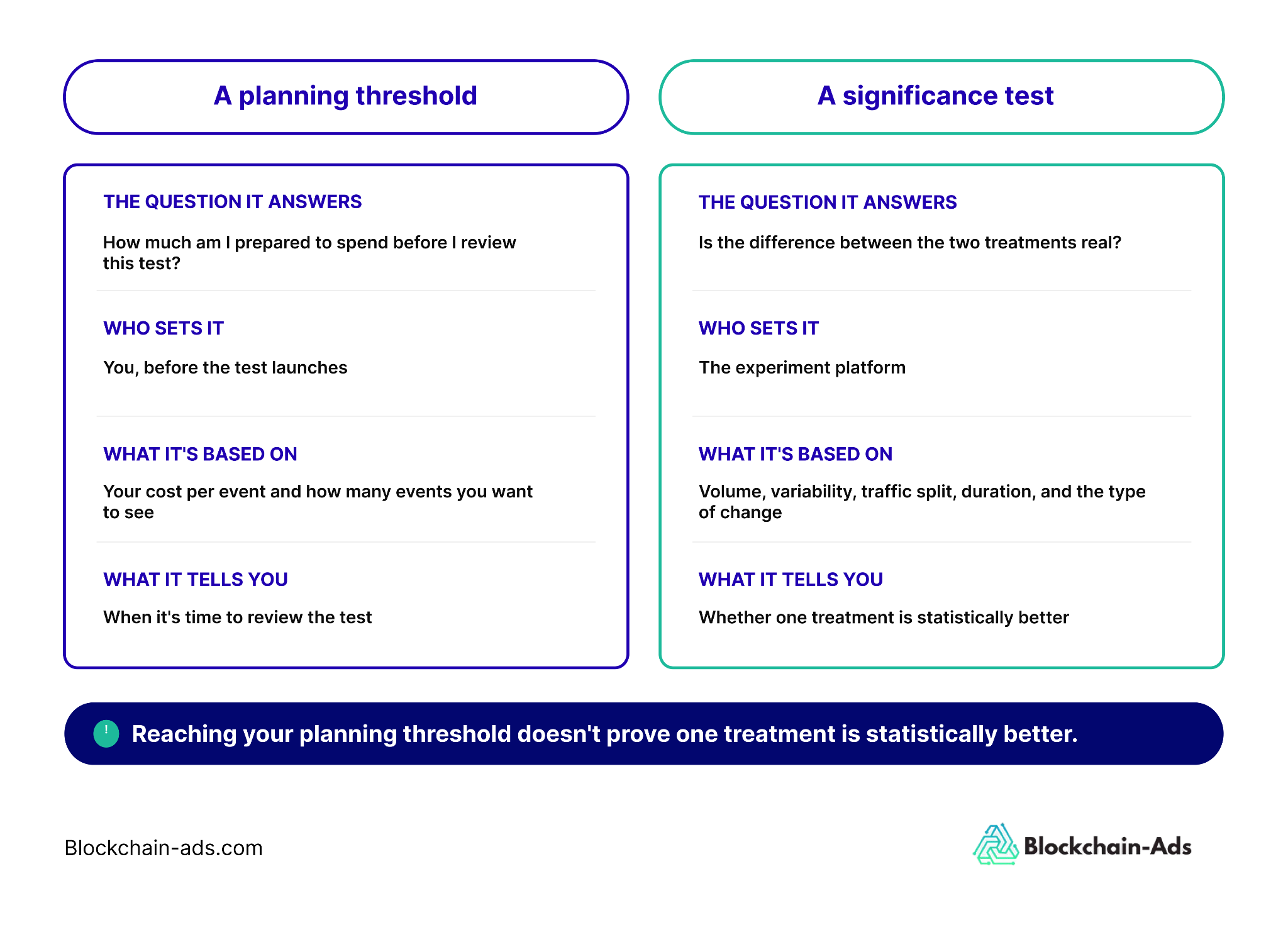
A campaign can reach your chosen planning threshold without proving that one treatment is statistically better than another.
Google Ads says experiment power depends on campaign volume, performance variability, traffic split, experiment duration, and the type of change being tested. Google also notes that experiments without enough traffic or data can remain inconclusive and may need a higher budget or a longer runtime.
That means there isn't one conversion count you can apply across every channel and call a test statistically significant.
Use the planned event count to answer a budgeting question: how much money are you prepared to give this test before you review it?
If you're running a controlled experiment and need a statistically significant result, use the experiment platform's own confidence and significance reporting rather than the planning threshold alone.
Split the Budget by the Job Each Part Needs to Do
Once you know the total, split it by acquisition stage before deciding how much each channel gets. This approach keeps you from assigning money to channels without first defining what you expect that spending to accomplish.
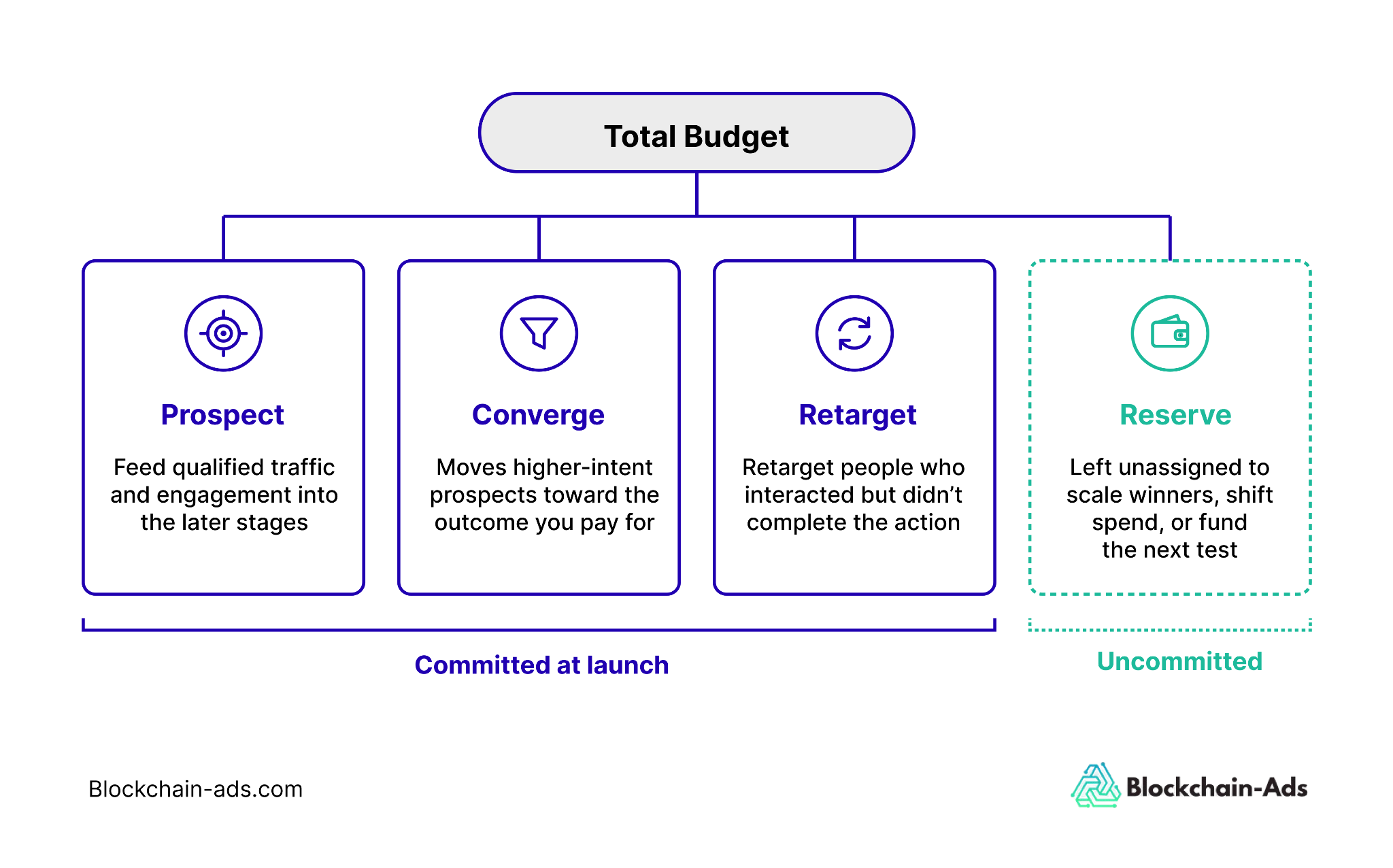
The Paid Media Budget Planner uses four buckets:
Prospect
Prospecting budget funds campaigns that reach new people who haven't yet entered your conversion pool. The goal is to create enough qualified traffic and engagement for the later stages of the campaign to work with.
How much you allocate here depends on the size of the reachable audience, the cost of reaching it, and how much new demand you need to feed into the rest of the funnel.
Converge
Converge budget supports campaigns you expect to move higher-intent prospects toward the conversion event you've chosen. These campaigns sit closer to the outcome you're paying for, so the allocation should reflect the expected cost of generating that event and the number of conversions you need.
Retarget
Retargeting budget is for people who have already interacted with your ads, site, or product but haven't completed the target action.
Plan for this spend rather than treating retargeting as whatever is left after prospecting and conversion campaigns are funded. Once you've built a large enough warm audience, retargeting can become its own acquisition layer. In our Binance case study, retargeting delivered 1,886 of 4,600 verified conversions in the final phase at a lower CPA than cold prospecting.
The amount you need will depend partly on how large the retargetable audience becomes as the campaign runs.
Reserve
Reserve is the part of the budget you deliberately leave uncommitted at the start.
You might use it to:
- Put more spending behind a promising campaign.
- Move the budget to another stage or channel.
- Extend a test that needs more data.
- Fund the next test.
A test budget is assigned to a specific campaign, while reserve stays unassigned until results tell you where it should go. We cover how to use it below.
Enter your total budget into the Paid Media Budget Planner and divide it across these buckets before breaking each stage into individual channels and campaigns. It'll help you see how much of the budget is already committed and how much remains available before you start adding more activity.
Allocate Each Stage Across Channels
Once each part of the budget has a job, decide which channels can do that job and how much each one should receive.
Allocate each channel based on what you need it to achieve and how much it can absorb efficiently.
Use these factors to decide the split:
- Objective: What stage of the acquisition journey is the channel supporting?
- Audience: Can the channel reach enough of the people you want to acquire?
- Expected cost: What do your historical CPM, CPC, CPA, or CAC figures suggest the channel can deliver at the planned spend?
- Past performance: How has the channel performed for the same or a comparable conversion event?
- Capacity: Can you add more spend without pushing costs beyond the level you're prepared to accept?
- Measurement: Can you track the event that will determine whether the allocation worked?
- Access: Can your business, product, and target market advertise on that channel under its current policies?
Your account data should carry more weight than a generic benchmark when you have enough history to plan from. Benchmarks are more useful when you're entering a new channel, launching in a new market, or working without reliable historical data.
Use Percentage Frameworks as a Starting Point
One common way to structure a media buying budget is the 70/20/10 approach: put most of the budget behind proven activity, a smaller share behind emerging opportunities, and the remainder into experiments. We cover this approach in more detail in our guide to media buying costs.
The framework can help you separate lower-risk spend from experimental spend, but it doesn't tell you whether the experimental portion is large enough to support the number of ad tests you want to run.
For example, allocating 10% of a $40,000 budget to testing gives you $4,000. Whether that is enough for one test, several tests, or none depends on the event you're measuring and how much it costs to generate enough of those events for a decision.
In the Paid Media Budget Planner, testing isn’t a separate bucket. Each test is funded from the stage it’s testing, so a test aimed at first deposits comes out of Converge. The 10% is the total you allow for testing across all stages combined.
Calculate How Many Ad Tests Your Media Buying Budget Can Support
Now that you know the planned budget for one test, you can work out how many tests fit within the amount you've set aside for testing.
Use this calculation:
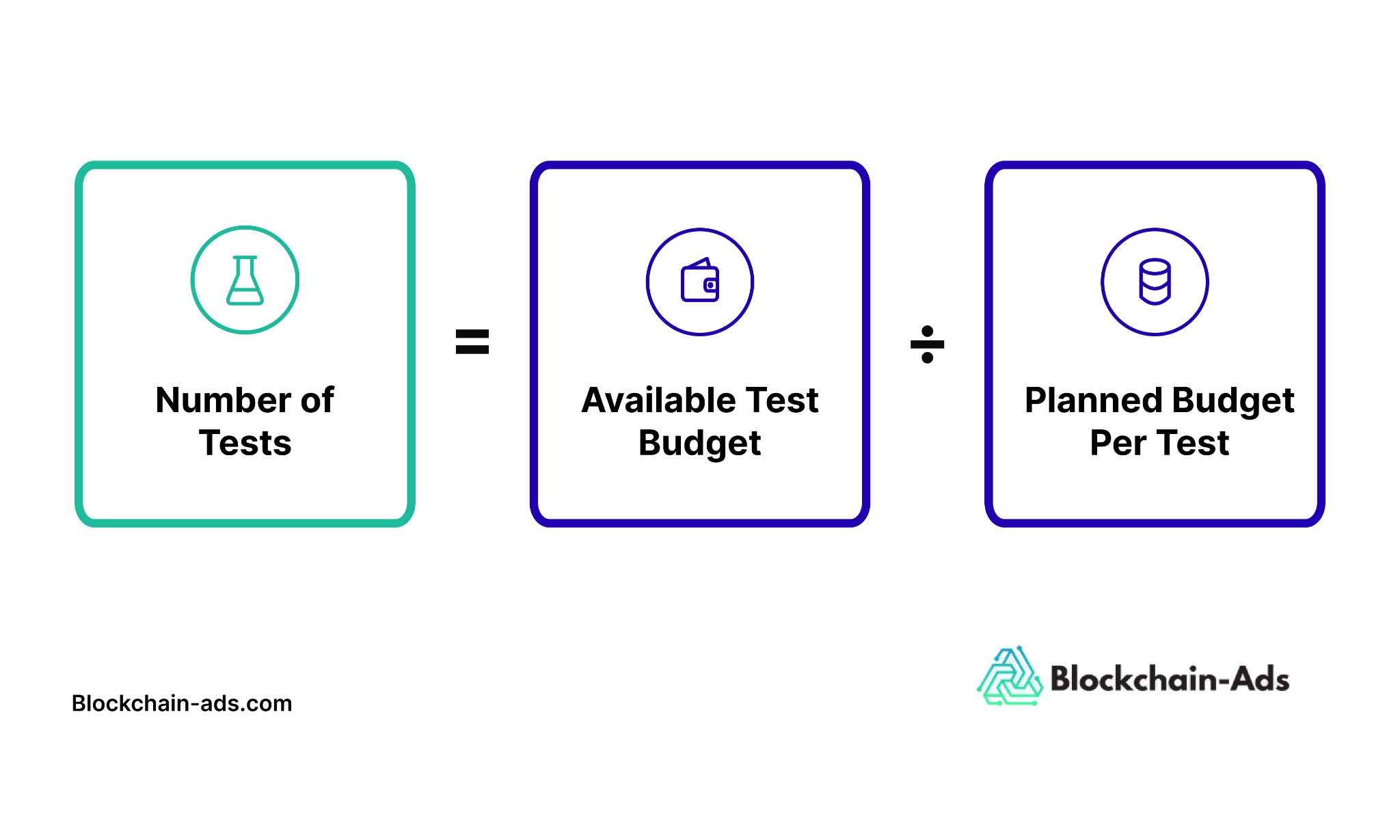
For example, if you have $4,000 available for testing and you've calculated that each test needs a planned budget of $3,040 (10 crypto conversions at the $304 median):
$4,000 ÷ $3,040 = 1 test, with $960 left over
That means the budget can fully fund one test at the level you've chosen. In crypto, a 10% testing allowance on a $40,000 budget covers one test at 10 conversions. To run more, you need a bigger testing allowance, fewer conversions per test, or a cheaper event to measure.
If you spread the same $4,000 across four tests, each one gets $1,000. That may be enough if the event you're measuring is relatively inexpensive, but it may leave more expensive conversion tests without enough budget to reach the planning threshold you set.
This is why the number of tests should come from the budget, rather than from how many campaign ideas are sitting in your backlog. You can have ten worthwhile hypotheses and still only have enough media buying budget to fund two of them properly.
Prioritize the tests that can answer the most important acquisition questions first. Then use the remaining ideas in later rounds as the budget becomes available or earlier tests free up spend.
Keep Part of the Budget Available for Reallocation
Don't commit the full budget at the start of the planning period. Keep a reserve so you can respond to what the first round of campaign data shows.
You can use that reserve to:
- Extend a test that needs more data.
- Fund the next test in your priority list.
- Increase retargeting spend as the warm audience grows.
- Move the budget away from a channel that isn't delivering.
- Add spend to a campaign that is meeting your cost target.
The point is to preserve flexibility without changing the plan every time a metric moves.
A reserve also helps separate committed spend from available spend. The first is already assigned to active campaigns and tests. The second is still available for whatever the current performance data justifies.
Consider holding back a larger reserve when you're working with new channels, new audiences, or several unproven tests. You can reduce it when performance is predictable and you have reliable historical data.
How much you reserve depends on:
- How quickly you expect to learn from the first tests.
- How much your channel costs fluctuate.
- How much freedom do you need to move spend during the month.
How Often Should You Evaluate Your Paid Media Budget?
You don't need to wait until the end of the month to check performance, but you also shouldn't rebalance the budget every time a metric moves.
Use these review cadences for different decisions:
Check Pacing and Delivery During the Campaign
Monitor whether campaigns are spending as planned and whether anything is stopping delivery.
Look for:
- Budget caps that are limiting a campaign expected to scale.
- Spend falling behind or running ahead of plan.
- Tracking or conversion-event failures.
- Campaigns that aren't serving.
- Sudden cost increases.
These checks help you catch operational problems without treating every short-term fluctuation as a reason to move the budget.
Review Tests After Their Planned Evidence Window
Evaluate a test after it has had enough time and budget to reach the planning threshold you set.
The timing will vary by platform and experiment type. For example, Google Ads recommends allowing 7–14 days for a custom experiment treatment arm to stabilize and says some experiments should run for at least 4–6 weeks when you need conclusive or statistically significant results.
Conversion lag matters too. If a meaningful share of conversions arrives days after the click or impression, reviewing too early can make a campaign look weaker than it is.
For example, suppose a broker campaign eventually generates 100 funded accounts from Monday's traffic, but 30 aren't recorded until several days later. Reviewing performance on Tuesday would understate the conversion rate and overstate the cost per acquisition.
Rebalance When the Evidence Supports a Decision
Once a test reaches its review point, decide whether to:
- Add budget.
- Extend the test.
- Stop the campaign.
- Reduce the allocation.
- Keep the allocation unchanged.
- Move reserve into another test or channel.
Your review cadence should follow the length of the conversion cycle, the amount of evidence you need, and the learning period of the platform you're using. A fixed weekly or monthly reallocation schedule can be useful operationally, but it shouldn't override those factors.
You can also tie the review point to the planned test budget. If a test has a $3,040 budget and that amount was set to cover the number of decision events you want before review, reaching $3,040 in spend becomes the review threshold.
Once the campaign reaches that spend, compare the conversions generated against the assumption you used to set the budget. If performance is materially behind plan, investigate whether the gap comes from delivery, conversion lag, tracking, or the campaign itself before reallocating spend.
What Does a Defensible Paid Media Budget Look Like?
A defensible budget should show how the total spend connects to acquisition stages, test budgets, and the amount you keep available for reallocation.
The crypto example in the Paid Media Budget Planner starts with a $40,000 monthly budget and divides it like this:
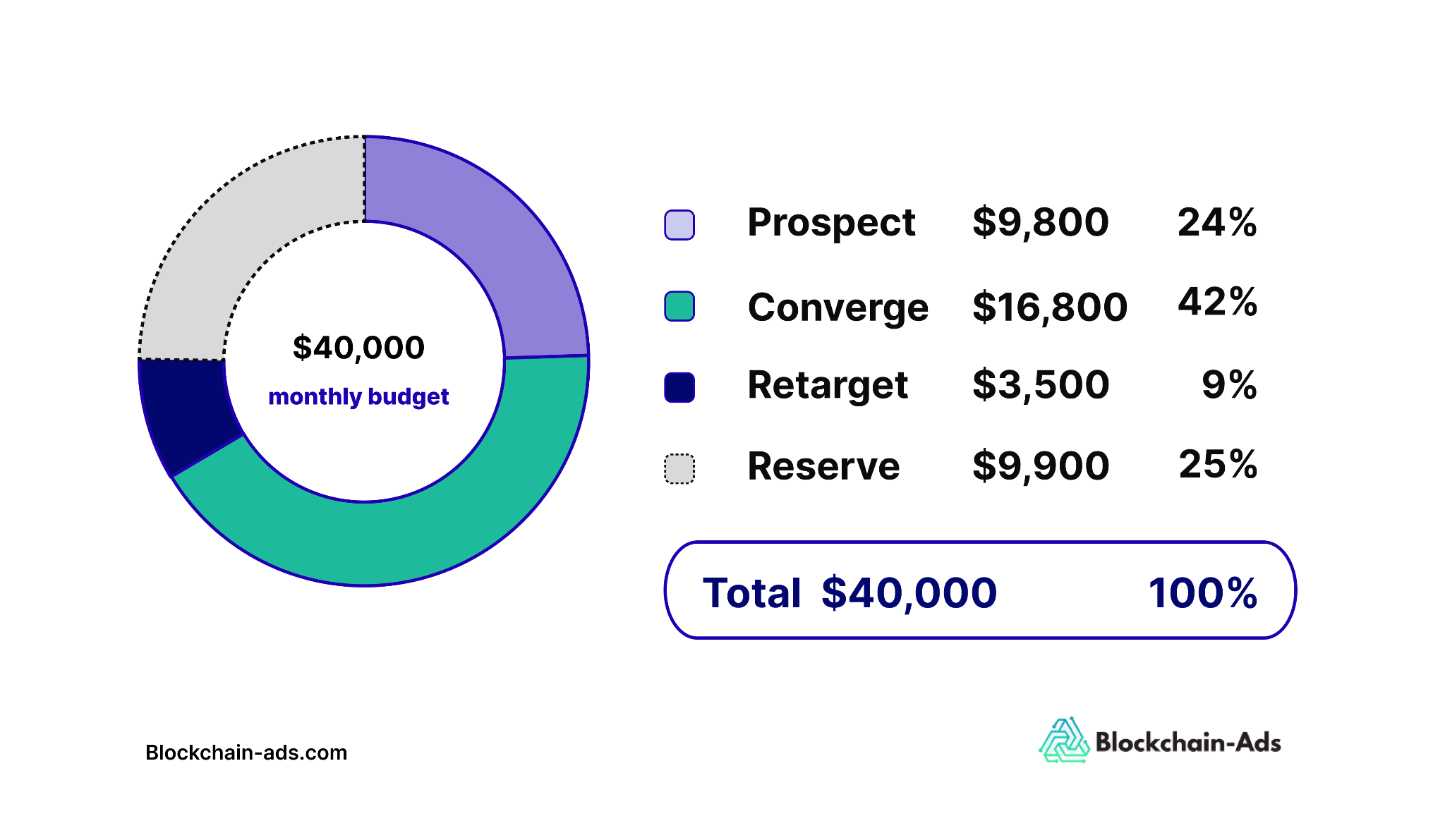
This isn't a recommended split for every crypto advertiser. It shows what a complete allocation can look like once each part of the budget has a defined job. Reserve is set at about 25% because this example includes new channels and several unproven tests. Converge gets the largest share because it’s closest to the first-deposit event being paid for. Retargeting starts small because the warm audience is still small in the first month.
From there, break each stage into the channels and tests it needs to fund. For every line item, you should be able to explain:
- What acquisition stage it supports.
- Which channel or campaign receives the spend.
- What event will determine whether the spend worked.
- How much budget the test needs before review.
- When you'll review the result.
- Whether additional spend will come from the reserve.
For example, if one $3,040 test, funded from your 10% testing allowance, sits inside the $16,800 Converge allocation, that leaves $13,760 for the other Converge campaigns and tests. Then, you can decide how many additional tests fit without drawing from the $9,900 reserve.
The value of the plan is that every allocation has a reason behind it. You can show where the money is going, what evidence each test is expected to generate, and how much budget remains available if the first round of results changes your priorities.
Use the Paid Media Budget Planner to Build Your Allocation
Enter your total budget, then divide it across Prospect, Converge, Retarget, and Reserve before breaking each stage into individual channels and tests.
The finished plan should show:
- Your total paid media budget.
- How that budget is split by acquisition stage and channel.
- The planned cost of each test.
- How many tests the budget can support.
- How much remains available for reallocation.
Use the planner to compare your planned spend against the budget before launch, then update the allocations as results come in and your priorities change.
FAQs
How Should I Split My Advertising Budget?
Start by splitting the budget according to the job the spend needs to do, such as prospecting, conversion-focused campaigns, retargeting, and reserve. Then divide each stage across the channels and tests that can support its objective. Avoid using a fixed percentage split unless it reflects your own costs, audience, and performance data.
How Much Should I Budget for Advertising?
Work backward from the acquisition outcome you need. Multiply the number of conversions or customers you want by the CPA or CAC you can afford, then check whether that amount fits within the budget available for the planning period. Broad industry benchmarks can provide context, but your acquisition goals and historical performance should carry more weight.
How Do I Allocate a Paid Media Budget Across Channels?
Allocate based on what each channel is expected to achieve, its historical performance, expected cost, audience reach, capacity to absorb more spend, measurement quality, and whether your business can advertise there. Give each channel enough budget to generate the clicks or conversion events you need before deciding whether to increase, reduce, or reallocate spend.
Raphael is a B2B SaaS and technical SEO writer covering digital advertising, Web3, fintech, and growth strategy.
View full profile →