


Running Dating Ads on Facebook: Policies, Setup & Alternatives
Facebook remains a powerful acquisition channel for dating brands. However, dating falls under one of Meta’s most strictly monitored categories, so it cannot be approached like a typical traffic campaign.
On Facebook, you are dealing with strict dating policies, unpredictable approvals, and higher costs as targeting in sensitive categories becomes more limited.”When those limits start capping your scale or making acquisition too expensive, programmatic ad platforms like Blockchain-Ads become the natural next step.
Blockchain-Ads gives dating and adult-adjacent brands access to compliant inventory, advanced behavioral and interest and intent-based targeting.
This guide will walk you through Meta’s dating ad eligibility and permission requirements, how to structure compliant targeting and creatives. It will also provide insights on how to avoid the most common rejection triggers across content, landing pages, and account behavior.
Can You Run Dating Ads on Facebook?
Yes, you can run dating ads on Facebook, but only if you qualify under Meta’s dating rules and stay within a narrow definition of what “dating” is.
What counts as a dating ad
Meta treats your campaign as a dating ad when you promote a service whose main purpose is:
- Helping people find dates or romantic partners online or offline
- Providing matchmaking services
- Managing or facilitating dating profiles on someone’s behalf
If your offer falls into any of these buckets, you must follow Meta’s dating ad policy and get explicit permission before you run ads.
What does not count as a dating ad
Meta does not treat your ad as “dating” if you are promoting:
- Content about relationships, such as books, courses, documentaries, TV shows, podcasts, or games that explore dating and relationships as themes
- General social or community apps where people meet for events, hobbies, or networking, but there is no built‑in matchmaking or dating feature
These campaigns still need to follow Meta’s general ad standards, but they do not go through the stricter dating-ads approval track.
Eligibility: dating services Meta will not promote
Even if you apply, some types of dating offers are simply not eligible to advertise on Meta at all. Meta’s policy excludes services that:
- Emphasize casual sexual encounters as the primary value proposition
- Tie dating to monetary or financial arrangements, such as “mail‑order bride” services, “sugar baby/sugar daddy” setups, or any relationship framed around payment or material benefits
- Facilitate affairs, infidelity, or non‑monogamous connections as the core product
- Try to connect users with fake, fabricated, or non‑real profiles, characters, or groups
If your service sits in any of these buckets, Meta will not approve your dating ads, regardless of how you structure the creative or landing page.
Facebook’s Dating Ad Policies & Approval Requirements
As we mentioned earlier, due to the sensitive nature of dating ads, Facebook has implemented policies and approval requirements to run such ads. The requirements are as follows:
Prior Written Permission – How to Apply and Typical Turnaround Times
You must first seek approval from Facebook to be able to run dating ads. This requires that you fill out the Dating Advertiser Application form. The application is designed to provide information about your business entity to help Facebook determine if you are eligible to advertise on its platform.
This will include your name, email, dating service, your budget and the parent company. The rest will focus on the details of the service you are advertising.
Age & Location Restrictions – Minimum Age, Geo-Targeting Rules
The dating ad must also target individuals aged 18 years and above. You ensure this by going to the audience section under 'Age, and choosing your target age range. Next, you can target an audience from a specific location, such as a country, region, city, or a radius around a specific address.
Targeting Prohibitions – banned personal-attribute targeting (e.g., relationship status).
Your dating ad must not contain personal info. This can be any content that implies directly or indirectly the personal attributes of your audience, including race, ethnicity, religious beliefs, age, sexual orientation, gender identity, criminal record, physical and mental health, and vulnerable financial status.
You must therefore not use prohibited language that implies personal attributes (e.g., “Are you gay…?”, “Meet other Black singles near you”). Instead, you can go for a compliant language that focuses on the service or community in neutral, inclusive language.
Creative Guidelines – prohibited content, no sexualisation, no misleading claims.
If your content aims to connect people or imply an ability to meet, then it should not be positioned in a sexual way or with the intent to sexualise. You must also refrain from misleading content, such as shady businesses, immoral practices (e.g., encouraging users to cheat), and impractical expectations.
Step-by-Step: Setting Up Your Facebook Dating Ad Campaign
Meta maintains dominance in the online marketing space, with its properties like Facebook, Instagram, and Messenger having the largest number of users, with over 6 billion active subscribers. Here is a step-by-step guide on how to successfully advertise on Facebook:
Account & Business Manager Setup – pages, ad account, privacy review
You can start by creating a Facebook account if you don't have one. However, if you already have one, log in to your personal account, click on 'Create a Business Portfolio', and then provide your business details. The business name and email address are then submitted. You will be requested to verify your email address.
With the business account set, you can proceed to add assets such as pages, ad accounts, and datasets, as follows:
- Adding a page: In the Meta Business Suite, click on Settings and select "Pages" under "Accounts" to add it.
- Adding an Ad account: Meta Business Suite will allow you to create a new ad account, claim an existing one or request to share in case you work for an agency and the account belongs to a client.
- Setting up a Meta Pixel: This is a piece of code that tracks how people interact with your website so you can measure performance and build retargeting audiences. To create it, go to Events Manager, select “Connect data,” choose “Web,” name your pixel, and click “Create.” Next, either use a partner integration (for example, a Shopify or WordPress plugin) or paste the base code manually into your site’s header, then configure events like sign-ups, purchases, and subscriptions so you can see exactly how your dating funnel is performing.
Audience Targeting
With the account set up, you can then start creating your Facebook Dating ad campaign. In audience targeting, Facebook allows you to include people based on their interests, age, and location.
Demographic Targeting – Overview of age, gender, and location
You choose your audience by selecting the target location, age range, gender, and language. You can also specify which cities to skip based on who you want to see your ad. The Facebook system will also display an estimated potential reach based on your budget.
Behavioural & Interest Targeting – how to craft proxy interests.
You can go to interests and target people based on the pages they follow and their general hobbies. This can be people who enjoy hiking, films, or music, or those who use dating apps like Tinder and Bumble.
In terms of behavior, you can target those with specific travel behaviors and others who shop frequently, especially if your app offers premium features.
Lookalike Audiences – using existing user lists.
If you have an existing user list, you can upload it to create a custom audience for re-engaging your ad campaign. Facebook will then find you a new audience with similar characteristics and direct your ads to them.
Creative Best Practices – photography, ad copy, and social proof elements.
Facebook offers various formats for presenting your ad to the audience. This can be through images, carousels, videos, and collections. As they are your opportunity to capture audience attention, you can employ the following strategies:
- Combine demographics, interests and behaviours using the “Narrow audience” feature in the Ads Manager.
- Capture your audience's attention quickly using a strong hook, such as an unexpected visual or sales promotion.
- Use attractive and vibrant colours that represent the personality of your brand.
- Ensure the correct image and video size.
- Incorporate the value proposition directly into the ad image for quick understanding.
Budgeting & Bidding Strategies – CPC vs. CPM, daily vs. lifetime budgets
Facebook offers you two budgeting strategies: daily and lifetime. The daily budgets are the amounts you spend per day, while the lifetime budget spans the campaign duration. Lifetime campaigns are best for seasonal campaigns.
Once you have decided on the kind of budget you want to go for, then choose any of the following bidding options offered:
- Lowest cost: you get results as per your budget
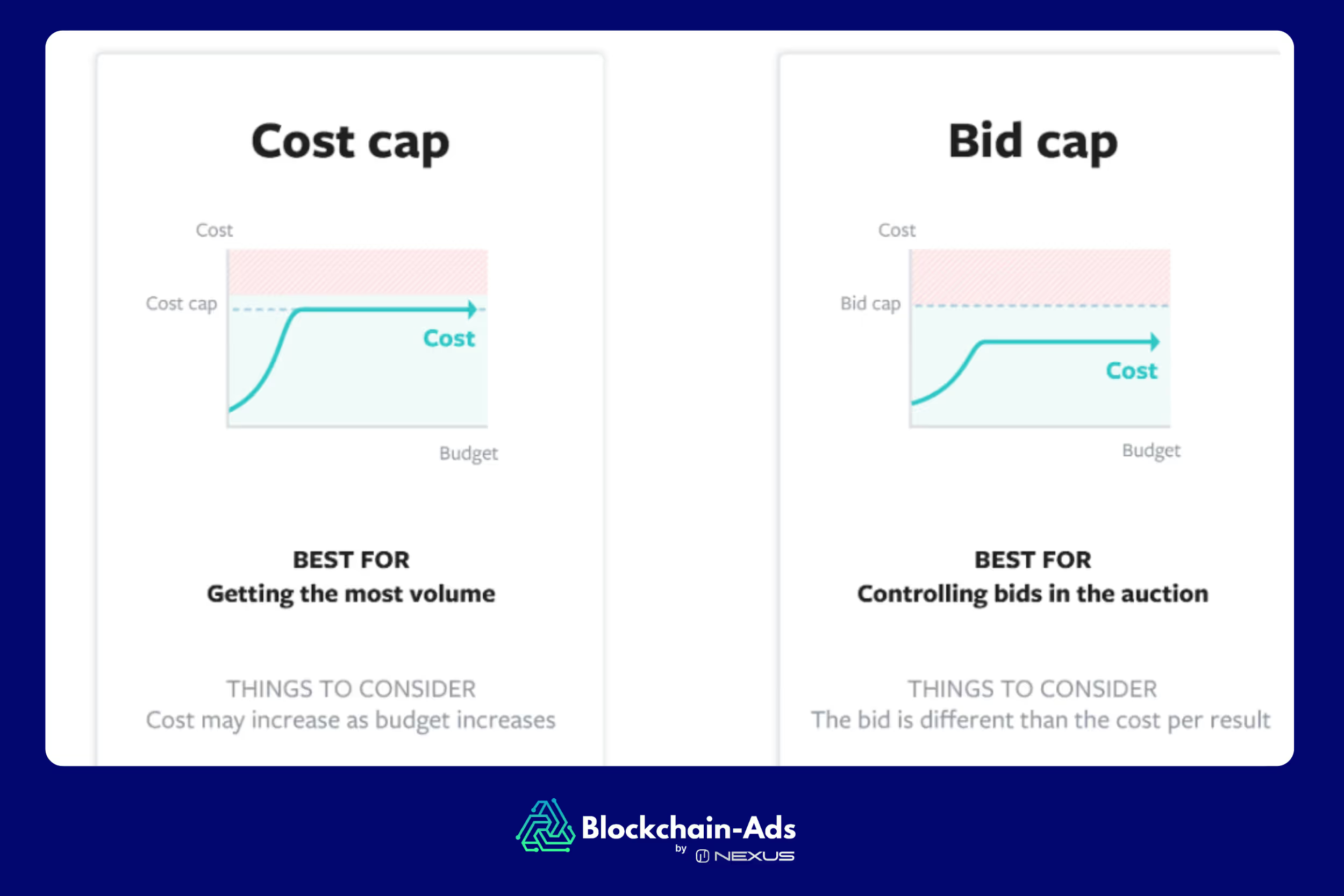
- Cost cap: You set a maximum cost per result for maximising volume
- Bid cap: Controls the maximum bid for each auction
- ROAS target: Focuses on the profitability of the ongoing ad campaign
If you are a beginner, with goals like traffic and engagement, then go for the Lowest Cost. You can use the following two images to understand better how the bidding options work and how they affect results.
Once the ad is up and running, you can always adjust your budget. But this comes at a price, as increasing your spend distracts the learning phase, which can temporarily reduce efficiency. If you still want to increase the budget, then ensure that it is no more than 20% every 3-5 days.
Meta will also allow you to optimise the results through CPM and CPC. in CPM (Cost per 1,000 impressions), your budget is deducted every time your ad is shown, regardless of whether someone clicks. This bidding strategy is best when you are aiming for awareness. For CPC (Cost per click), Facebook charges you when someone clicks on your ad. It's best when aiming for lead generation, website traffic and demo sign-ups.
Tracking & Analytics – Facebook Pixel, custom conversions.
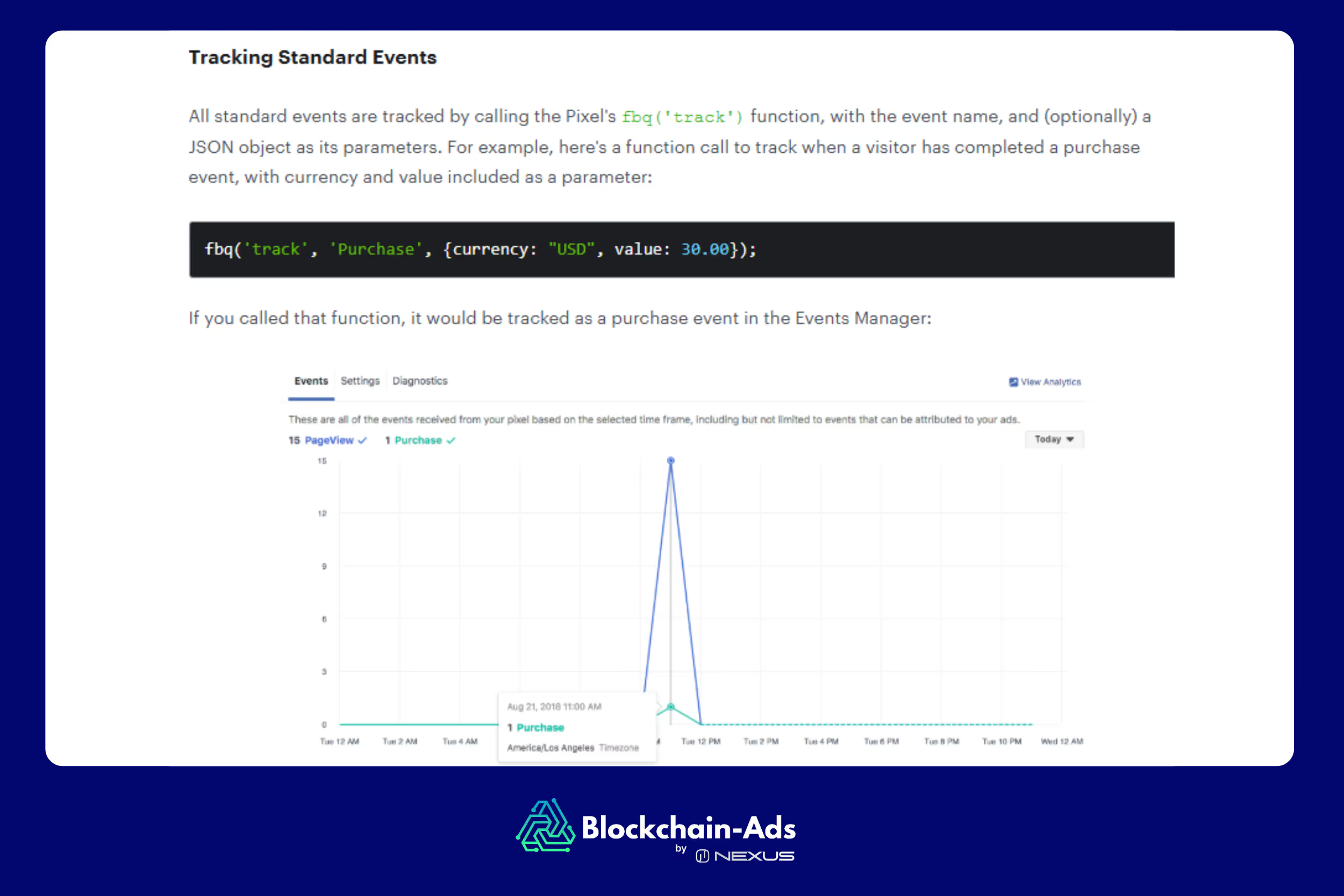
Facebook allows you to track and analyse the interactions of your dating ad campaign, such as purchases, sign-ups, and content views, using the Meta Pixel. The tracked conversions will appear in the Facebook Ads Manager and the Facebook Events Manager, where you can analyze the effectiveness and calculate the return on ad spend (ROAS).
Three ways that the Meta Pixel allows you to track conversions include:
- Standard events
- Custom events
- Custom conversions
By implementing the Meta Pixel and Custom Conversion Tracking and analysis feature, you will enhance your ad targeting, increase conversions, and gain a clear understanding of your ad performance.
Common Challenges & Pitfalls
The following are the common challenges you can experience while advertising on Facebook:
Unapproved ad rejections and how to appeal
Facebook general and dating advertising policies, Meta community standards and commercial and legal guidelines are the foundation of ad approval. So, if your ad remains unapproved, is recalled after approval, or is entirely rejected, you may be in violation.
Facebook will reject you when:
- It does not comply with the laws within your jurisdiction
- It’s discriminatory towards a demographic or group of people
- It promotes services, schemes, or misleading practices
Additionally, an ad may sometimes be recalled for review after it was approved. Facebook can do this at random to ensure accuracy, when they notice that they missed a non-compliance or if the ad receives unexpected high levels of engagement.
If you experience any of these, Facebook allows you to appeal by troubleshooting the ad. You can do this by editing the ad, creating a new one or requesting another review. Wait for them to change their decision, or simply track the ad's status in the Business Support Home.
Limited targeting options vs. other verticals
The push for privacy, from regulations like GDPR and CCPA to Apple’s tracking changes, has made granular targeting harder across all channels—and dating is hit even harder because it already sits in a restricted category. Data from Greenwich Capital Group suggests Apple’s privacy updates alone have cut the average mobile advertiser’s ROI by about 40%, which compounds the impact of Meta’s own rules on sensitive topics.
On Meta, if you narrow your dating audiences too much—by stacking interests, locations, and behaviors—you make it harder for the algorithm to find enough eligible users, which drives up CPMs and throttles delivery. For dating and adult-adjacent offers that already face stricter review and smaller eligible pools, this combination of privacy limits and over-segmentation can quickly kill volume, even when the offer and creative are strong.
Creative disapproval due to policy misreads
This is the central pain point for most advertising. Any advertiser can easily misread the strict guidelines on content rules or include claims that will cause their content to be flagged.
Rising costs and low conversion rates
It is no secret that the cost of running ads on Facebook is witnessing a steady increase. In fact, a 2025 report by Search Engine Land shows that the average Facebook Ad price increased by 14% in 2024. Additionally, cost per lead (CPL) also experienced a 21% increase in 2025.
This has been attributed to the rising demand, increasing competition, and the many privacy options that make it challenging to target audiences precisely.
Alternative: Running Dating Ads on Blockchain-Ads
The online dating market has thousands of competing sites and billions in yearly revenue, so you need more than broad social targeting to cut through. A performance platform that understands dating and adult traffic will give you better scale and control than a generic social channel.
Blockchain-Ads is a third-generation, full-stack advertising and data platform integrated into Nexus, already used by dating and adult brands across 10,000+ adult-friendly and mainstream publishers in 250+ GEOs. It helps you:
- Leverage behavioral signals and interest graphs: audiences are built from browsing patterns, content consumption, app usage, on-site engagement. Where relevant you can use on-chain and wallet activity, so you reach users who are already showing dating and adult intent.
- Reach niche pools: instead of broad “dating” interests, you can tap specific communities and behaviors that match your offer, which is critical when you focus on a clear niche or premium segment.
- Stay privacy-safe: targeting is based on pseudonymous behavioral and wallet signals, not real names, emails, or explicit sensitive attributes, so you can act on intent without relying on personal identity data.
Advanced Behavioural Targeting Features – real-time intent, multi-source data
With Blockchain-Ads, behavioral targeting combines multiple data sources into one engine:
- Off-site and on-site behavior (page views, clicks, session depth, content categories)
- Funnel events (registrations, subscriptions, deposits)
- On-chain and wallet signals for compatible offers
Nexus AI then shifts budget in real time toward the audience, placement, and creative combinations that generate the most valuable actions for your dating funnels, giving you a performance layer that is hard to replicate on Meta in this category.
Facebook vs Blockchain-Ads for Dating and Adult Verticals
How to Get Started – onboarding process and support.
To start with Blockchain-Ads, you first request access and complete a manual qualification and compliance review. This checks that your business is legally registered, follows advertising and data privacy laws, and does not promote restricted, misleading, or deceptive content. Once approved and your account is funded, you get access to the platform and a dedicated contact (either a campaign manager or certified agency partner) to help structure and launch campaigns.
Campaigns typically start from around a $10,000+ deposit, so the platform is best suited to teams that already know their CAC, LTV, and target CPA and want to scale. You can run campaigns directly through the DSP or work via certified agencies on a managed-service basis for creative, targeting, and optimization support. If you do not receive a response or run into issues during onboarding, you can reach the team at [email protected].
FAQ
Apart from using advertising, what are the other best practices that can help me ensure that my Facebook ad campaign is engaging?
You can increase engagement by using vertical videos, the carousel format, adding motion to capture attention, and employing CTAs.
Why has Facebook banned my dating ad?
Facebook can ban your previously approved ad campaign if it has an exceptionally high engagement or if many users have reported it. Additionally, they may have noticed that your ad is violating some of its policies. You can review the ad and ensure its compliance, then seek an appeal.
How do I start running dating ads on Facebook?
To run dating ads on Facebook, you must first fill out an application form and request that Facebook allow you to proceed with the ad. You can find this form on the Facebook Help Centre.
Conclusion & Next Steps
Facebook is definitely a top platform for online dating ads, primarily due to its high audience reach. It has also put in place various compliance checkpoints that not only protect the quality of their content but also prioritise the safety of their users. However, its strict guidelines and the long time it takes to address issues can sometimes affect its effectiveness. This is why it is best for you, as an advertiser, to opt for alternatives like Blockchain-Ads, which will fully focus on you. These platforms also have targeting tools that go beyond basic demographic targeting. They merge behaviour, interest and blockchain-level insights to ensure that your ad reaches the right audience at the right time.
Read related blogs

Talk with some of our current partners
View all success stories

Reach 12M+
Sign up to become an affiliate today