El manual de atribución: cómo eliminar el 40–60% del gasto publicitario desperdiciado
Por qué importa la atribución
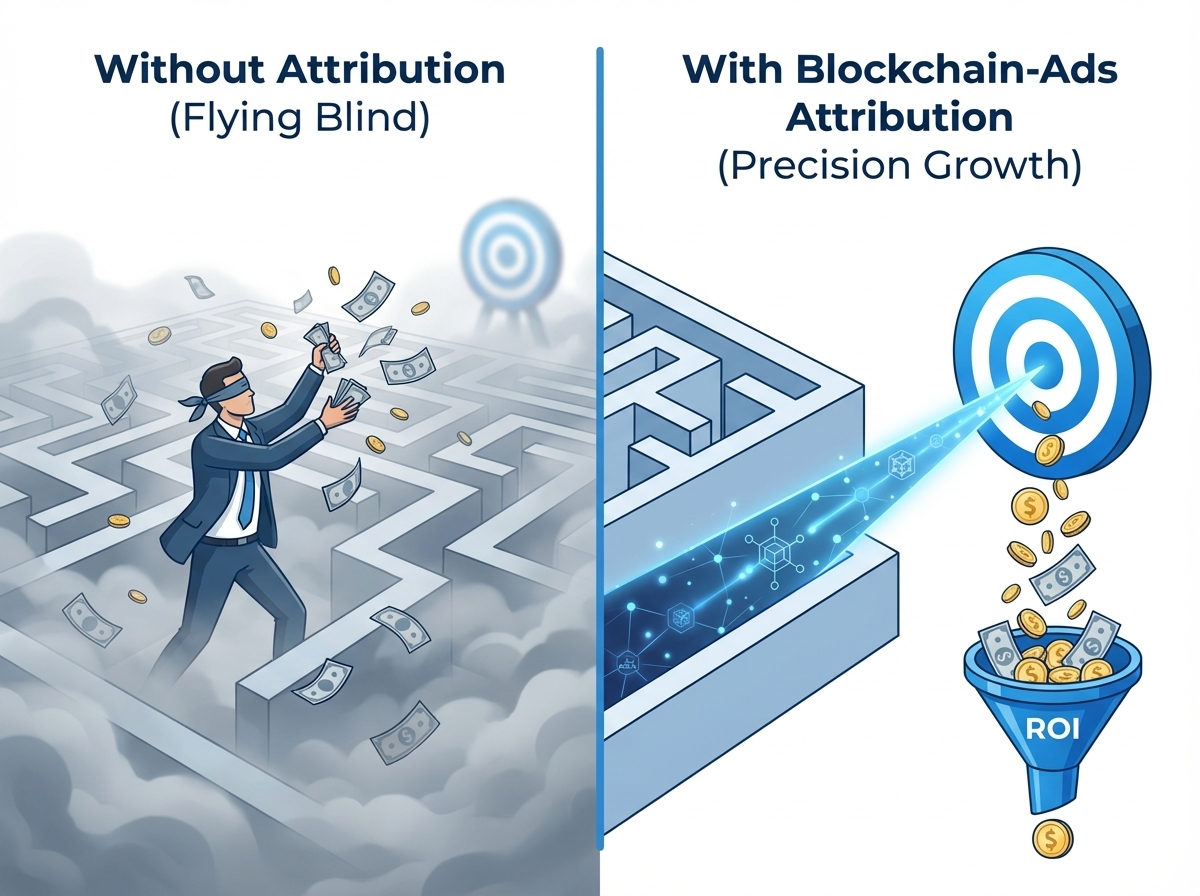
La atribución es la base de una publicidad rentable. Sin un seguimiento adecuado, avanza a ciegas y gasta presupuesto sin saber qué está generando realmente los resultados.
El problema de fondo
La mayoría de los anunciantes desperdician un 40-60% de su gasto publicitario en audiencias, creatividades y ubicaciones que no convierten. La atribución adecuada elimina ese desperdicio al devolver datos de conversión reales al algoritmo.
Qué permite una atribución adecuada:
- Optimización automática hacia los usuarios que de verdad convierten, no solo los que hacen clic
- Visibilidad clara de qué creatividades generan registros, depósitos y ventas
- Datos de rendimiento a nivel de GEO para escalar los ganadores y recortar los que fallan
- Seguimiento del coste por adquisición (CPA) en todo el embudo
- Cálculo del ROI con datos de ingresos reales
Blockchain-Ads ofrece varios métodos de atribución: píxel del lado del cliente, postbacks servidor a servidor (S2S) e integraciones nativas con plataformas de seguimiento populares. Esta guía cubre todas las opciones.
2. Métodos de seguimiento
Elija su método de seguimiento en función de su configuración técnica, los tipos de conversión y su stack de seguimiento actual.
| Factor | Seguimiento por píxel | Postbacks S2S |
|---|---|---|
| Implementación | Fragmento de JavaScript en el sitio web | Llamada a la API del lado del servidor |
| Dificultad técnica | Baja (copiar/pegar) | Media (mediante integración) |
| Resistente a bloqueadores de anuncios | No | Sí |
| Ideal para | Eventos del sitio web, páginas de destino | Instalaciones de apps, eventos in-app |
| Precisión de los datos | Buena (90-95%) | Excelente (99%+) |
| Datos en tiempo real | Sí | Sí |
| Conversiones offline | No | Sí |
Recomendación
Use AMBOS métodos en todas las campañas. El píxel para eventos del sitio web (registros, envíos de formularios) y S2S para conversiones de alto valor (depósitos, compras, acciones in-app). Así consigue la máxima captura de datos y resistencia frente a los bloqueadores de anuncios.
2.1 Implementación del seguimiento por píxel
El píxel de Blockchain-Ads es un fragmento de JavaScript que se activa cuando los usuarios realizan acciones concretas en su sitio web.
Paso 1: Instale el píxel base en la sección <head> de su sitio web. Recibirá su código de píxel único en el panel de Blockchain-Ads.
Paso 2: Configure los eventos de conversión. El píxel admite eventos estándar y personalizados:
| Tipo de evento | Cuándo se activa | Caso de uso |
|---|---|---|
| PageView | Cada carga de página | Seguimiento de tráfico, retargeting |
| Lead | Envío de formulario | Boletín, formularios de contacto |
| Registration | Cuenta creada | Captación de usuarios |
| Deposit | Fondos añadidos | Fintech, gaming, apuestas |
| Purchase | Transacción completada | E-commerce, suscripciones |
| CustomEvent | Cualquier acción concreta | Instalaciones de apps, descargas, etc. |
Paso 3: Transmita los valores de conversión cuando corresponda. Para compras y depósitos, incluya el valor de la transacción para habilitar la optimización por ROAS.
Importante
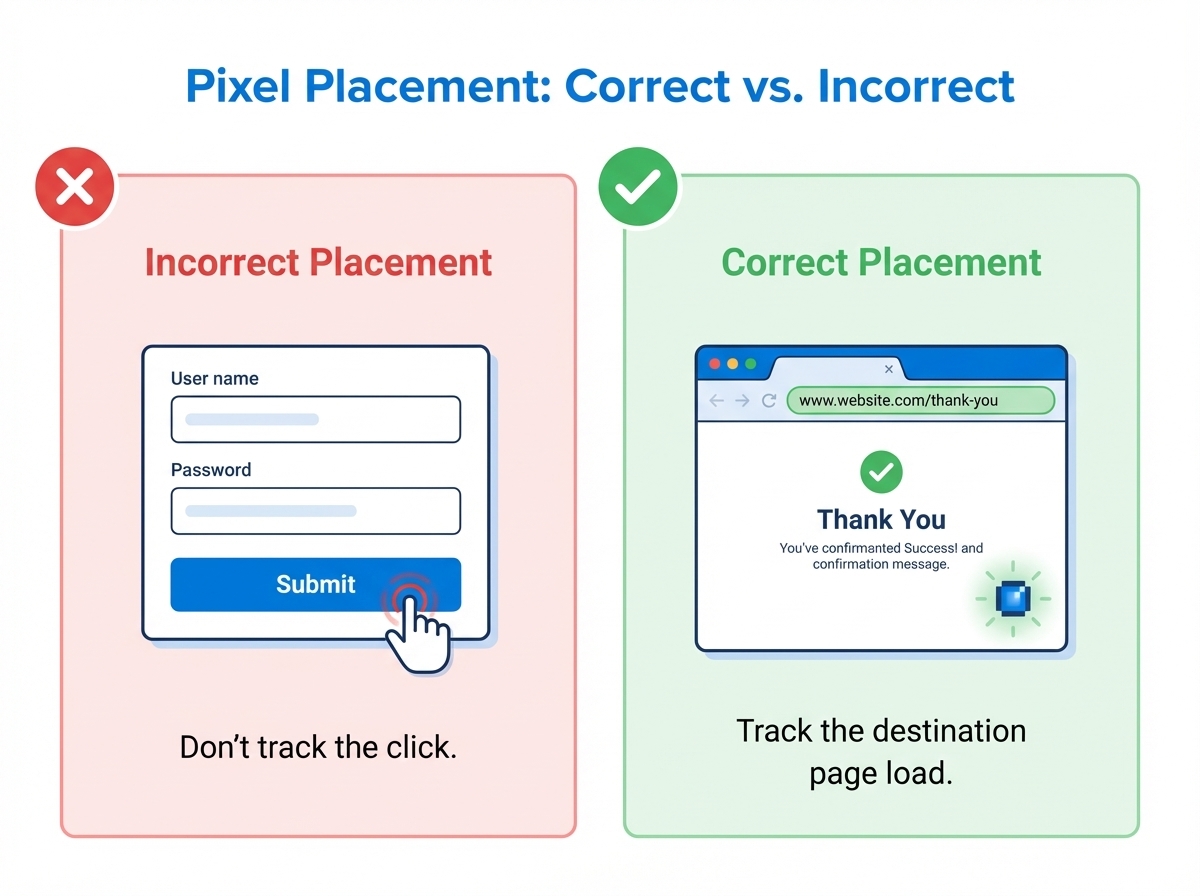
Coloque los eventos de conversión solo en las páginas de confirmación o de éxito, no en los clics de botón. Así se asegura de medir conversiones reales y no la intención.
2.2 Configuración de postbacks servidor a servidor (S2S)
Los postbacks S2S envían los datos de conversión directamente desde su servidor a Blockchain-Ads. Este método es inmune a los bloqueadores de anuncios y ofrece los datos más precisos.
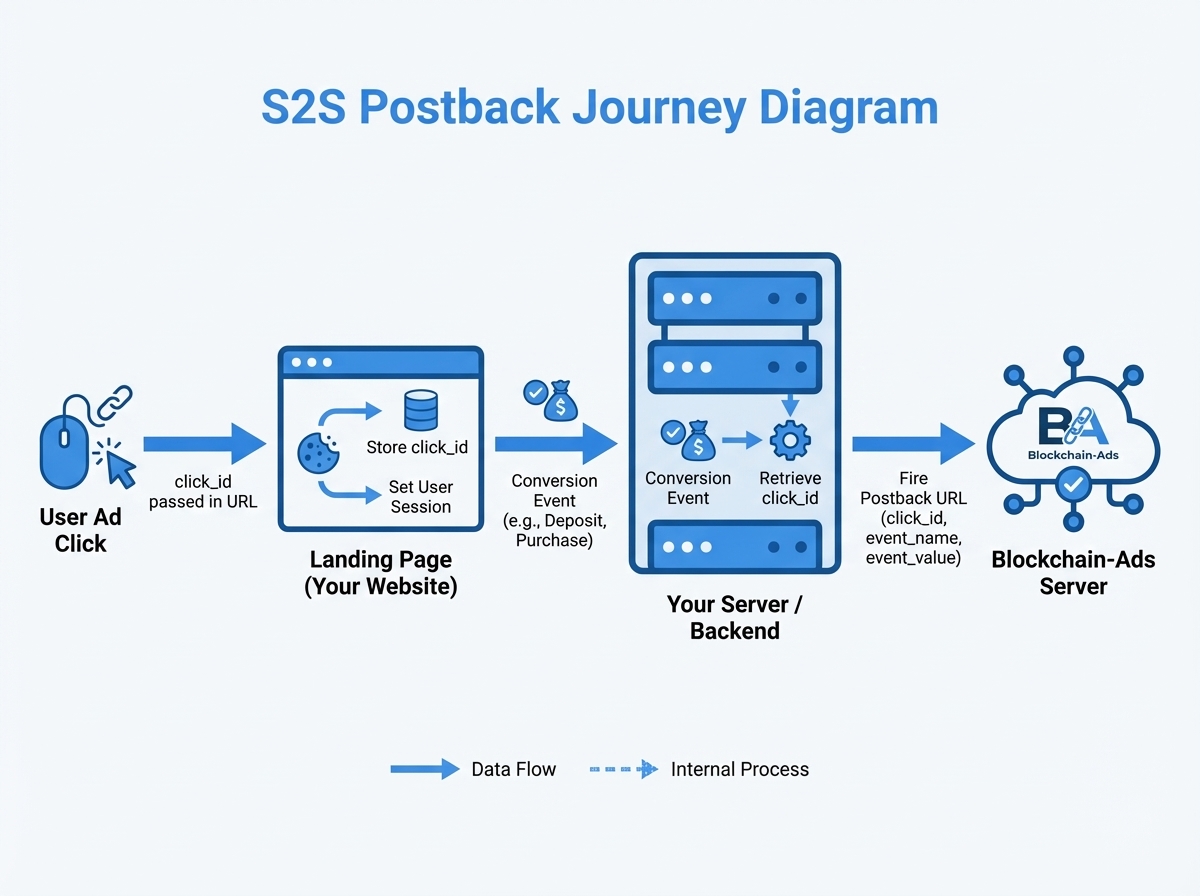
Cómo funciona S2S:
- El usuario hace clic en su anuncio → Blockchain-Ads añade un click_id único a la URL
- Su página de destino captura y almacena el click_id (cookie o base de datos)
- El usuario convierte → su servidor envía un postback con el click_id
- Blockchain-Ads asocia la conversión al clic original
Parámetros de postback obligatorios:
| Parámetro | Descripción | Obligatorio |
|---|---|---|
| click_id | Identificador único del clic en el anuncio | Sí |
| event_name | Tipo de conversión (registro, depósito, etc.) | Sí |
| event_value | Valor monetario de la conversión | Recomendado |
| event_time | Marca de tiempo Unix de la conversión | Recomendado |
| user_id | Su identificador interno de usuario | Opcional |
Checklist de implementación:
- Capture el click_id de los parámetros de la URL en la página de destino
- Almacene el click_id con la sesión del usuario o en una base de datos
- Configure el endpoint de postback en el panel de Blockchain-Ads
- Envíe el postback del lado del servidor cuando se produzca la conversión
- Incluya el valor del evento para la optimización basada en ingresos
- Pruebe con una conversión manual antes de la puesta en marcha
2.3 Integraciones de terceros
¿Ya usa una plataforma de seguimiento? Blockchain-Ads se integra de forma nativa con las herramientas que ya utiliza, así que puede empezar a medir conversiones sin configuración adicional.
Integraciones compatibles:
| Plataforma | Tipo | Ideal para |
|---|---|---|
| AppsFlyer | Atribución móvil | Instalaciones de apps, eventos in-app, campañas móviles |
| Keitaro | Tracker | Campañas de afiliación, distribución de tráfico, pruebas A/B |
| Voluum | Tracker | Gestión de campañas, seguimiento de varias fuentes |
| Google Analytics 4 | Analítica | Eventos del sitio web, insights de audiencia, datos entre canales |
| Binom | Tracker | Seguimiento autoalojado, campañas de alto volumen |
| RedTrack | Tracker | Seguimiento de conversiones, reglas de automatización |
| Bemob | Tracker | Seguimiento en la nube, informes en tiempo real |
Cómo conectar:
- Vaya a Integraciones en su panel de Blockchain-Ads
- Seleccione su plataforma de seguimiento
- Siga la guía de configuración específica de la plataforma (clave de API, URL de postback o configuración del píxel)
- Asigne sus eventos de conversión a los eventos de Blockchain-Ads
- Envíe una conversión de prueba para verificar el flujo de datos
Consejo
Si ejecuta campañas de apps móviles, conecte AppsFlyer primero. Así garantiza una atribución precisa de las instalaciones y el seguimiento de eventos in-app en todas sus fuentes de tráfico, con los datos fluyendo directamente a Blockchain-Ads para la optimización.
Ventajas de usar integraciones nativas:
- No requiere píxeles ni código adicionales
- Aproveche su configuración de seguimiento y sus datos actuales
- Informes unificados de todas las fuentes de tráfico
- Lanzamiento de campañas más rápido: conecte y en marcha
- La sincronización automática de datos mantiene el flujo de conversiones en tiempo real
3. Estrategia de eventos de conversión
No todas las conversiones son iguales. Estructure sus eventos para captar todo el embudo y optimizar por las métricas que importan.
3.1 Estructura de eventos basada en el embudo
Principio clave: Optimice por el evento más profundo del embudo que tenga volumen suficiente. Necesita 15-30+ conversiones por semana para que el algoritmo optimice de forma eficaz.
| Etapa del embudo | Evento | Uso en la optimización |
|---|---|---|
| Parte alta | PageView, Click | Descubrimiento de audiencia, alcance |
| Parte media | Registration, Lead | Coste de captación de usuarios |
| Parte baja | Deposit, Purchase | Ingresos, ROAS, LTV |
| Retención | Repeat Purchase, Renewal | Valor a largo plazo |
3.2 Selección de eventos por vertical
Utilidades / VPN:
- Principal: inicio de suscripción (con el valor del plan)
- Secundario: prueba gratuita, registro
- Avanzado: mejora de plan, renovación, alta por referido
Sorteos:
- Principal: SOI (opt-in simple) o DOI (opt-in doble)
- Secundario: confirmación de email, interacción con la página
- Avanzado: envío de datos de tarjeta (CC Submit), conversión de pago
iGaming:
- Principal: primer depósito (FTD) con valor
- Secundario: registro, verificación de la cuenta
- Avanzado: depósito repetido, umbral de high roller, primera apuesta realizada
Dating:
- Principal: suscripción de pago o compra de créditos
- Secundario: registro, perfil completado
- Avanzado: mensaje enviado, mejora a premium, renovación de suscripción
Forex / trading:
- Principal: primer depósito (FTD) con valor
- Secundario: registro, KYC completado, cuenta demo
- Avanzado: primera operación, nivel de depósito ($500+, $1K+), lead cualificado
Cripto:
- Principal: primer depósito (FTD) o primera compra
- Secundario: registro, KYC completado, conexión de wallet
- Avanzado: operación ejecutada, nivel de depósito, acción de staking
Finanzas / préstamos:
- Principal: lead cualificado (solicitud completa enviada)
- Secundario: precalificación, solicitud parcial
- Avanzado: préstamo financiado, aprobación, carga de documentos completada
E-commerce:
- Principal: compra (con el valor del pedido)
- Secundario: añadir al carrito, registro
- Avanzado: compra repetida, pedido de alto AOV, inicio de suscripción
Apps móviles:
- Principal: compra in-app o acción clave
- Secundario: instalación de la app, registro
- Avanzado: retención en el día 7, inicio de suscripción, nivel completado
Nutra / salud:
- Principal: venta (confirmación COD o envío de datos de tarjeta)
- Secundario: lead, pedido de prueba
- Avanzado: upsell aceptado, rebill de suscripción, pedido repetido
Regla de volumen
Si su evento de la parte baja del embudo (depósito, compra) tiene menos de 15 conversiones por semana, optimice primero por un evento de la parte media (registro, lead). Cuando el volumen aumente, traslade la optimización al evento de mayor valor.
4. Cómo optimiza el algoritmo
Una vez que el seguimiento está activo, el algoritmo de Blockchain-Ads usa sus datos de conversión para mejorar automáticamente el rendimiento de la campaña. Entender este proceso le ayuda a configurar las campañas para una optimización máxima.
4.1 El ciclo de optimización
- Recopilación de datos: el píxel/S2S/la integración envía señales de conversión con los datos de usuario y de contexto asociados
- Reconocimiento de patrones: el algoritmo identifica las características de los usuarios que convierten
- Refinamiento de la audiencia: la entrega se desplaza hacia los usuarios que coinciden con los perfiles de alta conversión
- Análisis de creatividades: el sistema identifica qué banners generan más conversiones
- Optimización por GEO: el presupuesto se desplaza automáticamente hacia las regiones de mejor rendimiento
- Aprendizaje continuo: cada nueva conversión afina aún más el modelo
4.2 Qué se optimiza
| Dimensión | Cómo se optimiza | Qué necesita aportar |
|---|---|---|
| Audiencias | El algoritmo encuentra los segmentos de mayor conversión | Empiece amplio y deje que los datos acoten |
| Creatividades | Las de mejor rendimiento reciben más entrega | Suba 3-5+ variaciones |
| GEO | El presupuesto se desplaza a las mejores regiones | Empiece por los mercados objetivo |
| Ubicaciones | Se prioriza los sitios de mejor rendimiento | Ninguna (automático) |
| Horario | La entrega se optimiza por día/hora | Ninguna (automático) |
4.3 Cronograma de optimización
Días 1-3: fase de aprendizaje
- El algoritmo explora ampliamente entre audiencias, creatividades y ubicaciones
- El rendimiento puede ser irregular, y eso es normal
- NO haga cambios importantes durante esta fase
Días 4-7: formación de patrones
- Surgen los primeros patrones en los perfiles de usuarios que convierten
- Las 2-3 mejores creatividades empiezan a diferenciarse
- El rendimiento por GEO se aclara
Semana 2+: optimización activa
- El algoritmo optimiza activamente la entrega hacia los ganadores comprobados
- El CPA debería bajar y la tasa de conversión subir
- Es seguro hacer mejoras iterativas (nuevas creatividades, GEO ampliados)
Importante
Dé a las campañas al menos 7 días y 30+ conversiones antes de evaluar el rendimiento. Las decisiones de optimización prematuras basadas en datos insuficientes perjudicarán los resultados.
5. Checklist de implementación
Use este checklist para asegurarse de que su seguimiento está bien configurado antes de lanzar campañas.
Verificación previa al lanzamiento
- Método de seguimiento seleccionado (píxel, S2S o integración de terceros)
- Píxel base instalado O postback configurado O integración conectada
- Eventos de conversión configurados para cada etapa del embudo
- Valores de evento transmitidos para los eventos basados en ingresos
- Captura del click_id verificada (si usa S2S)
- Conversión de prueba activada y recibida en el panel
- Deduplicación de conversiones configurada (evita el doble conteo)
Configuración de la campaña para la optimización
- Evento de conversión principal seleccionado (el de mayor valor con volumen suficiente)
- 3-5 variaciones de creatividades subidas
- GEO objetivo seleccionados según las prioridades del negocio
- Presupuesto diario ajustado para permitir un mínimo de 2-3+ conversiones al día
- La ventana de atribución coincide con su ciclo de conversión
Monitorización continua
- Los datos de conversión fluyen a diario en el panel
- Sin vacíos de seguimiento ni datos faltantes
- Comprobación de estado del píxel superada (sin errores)
- Tasa de éxito de postbacks/integración superior al 99%
6. Resolución de problemas frecuentes
| Problema | Causa probable | Solución |
|---|---|---|
| No aparecen conversiones | El píxel no se activa o el nombre del evento es incorrecto | Verifique el píxel en las herramientas de desarrollo, revise la configuración de eventos |
| Discrepancia en el recuento de conversiones | Doble activación o falta de deduplicación | Añada lógica de deduplicación, revise el flujo de páginas |
| Los postbacks S2S fallan | click_id no válido o error de endpoint | Verifique la captura del click_id, revise los logs del servidor |
| La integración no se sincroniza | Clave de API caducada o error de asignación | Vuelva a conectar la integración, verifique la asignación de eventos |
| CPA alto después de 2 semanas | Evento de optimización incorrecto o volumen bajo | Cambie a un evento de mayor volumen, aumente el presupuesto |
| Hay conversiones pero no optimización | Volumen de datos insuficiente | Se necesitan 30+ conversiones para una optimización significativa |
Próximos pasos
Una atribución adecuada marca la diferencia entre suponer y saber. Con el seguimiento bien configurado, cada dólar que gasta genera datos que hacen más eficaz el siguiente.
¿Listo para implementarlo?
- Inicie sesión en su panel de Blockchain-Ads
- Vaya a Configuración de seguimiento o Integraciones
- Elija su método: píxel, S2S o conecte su tracker actual
- Active una conversión de prueba
- Lance su campaña optimizada
Comience ahora
Regístrese para convertirse en afiliado hoy
¿Listo para llegar a su cliente ideal?
El acceso está limitado a anunciantes cualificados.